This is probably the best looking docking station I’ve ever seen in my entire life – and I can’t wait to test it

- This tiny docking station will fit snug on any home office desk
- The MEMDock G2 is ideal for MacBook users
- Perfect for users with additional monitors
Docking stations are a dime a dozen in 2025, but finding one that ticks all the boxes can often be a challenge. Luckily, the MEMDock G2 does precisely that – and it looks fantastic to boot.
The MEMDock G2 builds on its previous iteration, which was designed primarily as a MagSafe dock for iPhones. Naturally, it’s bigger than its predecessor, but the G2 still boasts an impressively compact frame, making it the perfect companion to a MacBook Pro on a home or office desk.
It’s not limited to laptops, though, and is compatible with desktops and even gaming consoles, making it a versatile option for professionals and casual users alike.
Under the hood of the MEMDock G2
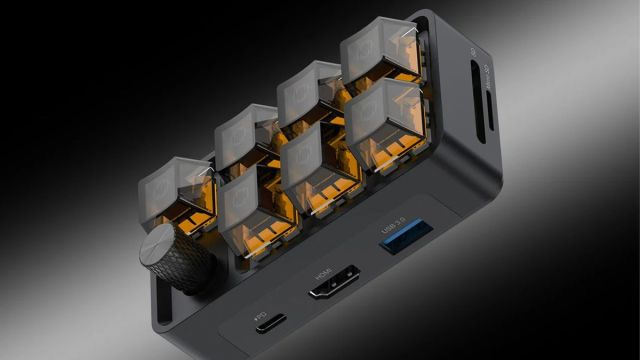
Complete with a customizable mechanical keypad – which includes six programmable keys that can be tuned to your heart’s content – the G2 also includes a single control knob.
Users also have the option to assign specific keys to particular functions or macros through its complementary app. The docking station features seven ports in total. These include a 100W power delivery (PD) charging port, allowing users to charge a range of devices simultaneously, alongside two USB 3.0 and one USB-C 3.1 port offering speeds up to 10Gbps to streamline file transfers.
From a productivity perspective, however, is where the MEMDock G2 is a gamechanger for users. The docking station includes an HDMI output, which supports a 4K monitor up to 60Hz, making it ideal for those with an external display or mixing and matching screens.
Given the dock has great power supply options, this also means fewer cables littering your home office workstation alongside any additional monitors.
In a hands-on review by Yanko Design, the publication noted that setting up the docking station is surprisingly easy and is very much a plug-in-and-play device.
There are certain downsides, though. While Windows users have complete access to key customization capabilities, macOS doesn’t currently support custom key programming features. MEMDock has hinted at future updates to expand these capabilities, however.
You might also like

This tiny docking station will fit snug on any home office desk The MEMDock G2 is ideal for MacBook users Perfect for users with additional monitors Docking stations are a dime a dozen in 2025, but finding one that ticks all the boxes can often be a challenge. Luckily, the…
