Netflix finally brings a major Android feature to iPhones – and I could not be happier

- Netflix adds Download Season to iPhone and iPad apps
- The update comes after Android users got it
- It follows a significant price increase
During the dark days, the ones where my home broadband network went offline, we struggled to stream Netflix content on our iPads and iPhones. If only we’d had this recent update: the ability to download entire seasons.
Granted, that might not have worked so well with the almost useless 5G connection on my iPhone, but if I’d already had the ability to download entire seasons of Squid Game and Man on the Inside, we might’ve already had all those shows resident on our iPhones and iPads. In that case, who needs a connection?
The ability to download an entire series on one of the best streaming services is not entirely new. Android users have had it for a while. Netflix on my new Samsung Galaxy S25 Ultra had this ability from the moment I installed the streaming service.
How to get it
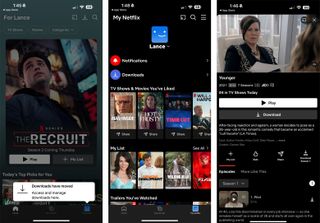
The new download capability wasn’t there today when I checked my iPhone 16 Pro Max. But I found a quick way to add it. I deleted the app from my phone and reinstalled it. Presto! Netflix Downloads management center moved to a new location under My Netflix, and shows where downloads are available now include a Download Season option next to the Share icon.
In the case of multi-season shows, the label says “Download Season 1” or whatever season you’re in. In the case of a limited series or one with just a single season under its belt like A Man on the Inside, it’ll say something like “Download 8 Episodes.”
Over WiFi, it took about a minute to download 8 episodes of A Man on the Inside. To double-check the utility of this feature, I put my phone in airplane mode and was pleased to see that I could play any of the episodes.
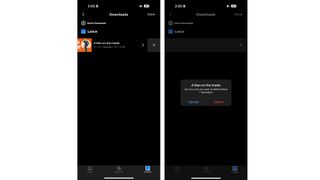
I could also go into the Download Management section and delete the episodes individually or the entire season with one click.
Being able to watch Netflix streamers offline is a big deal. I know that in my house, when we had no connectivity and were only watching what we could stream live at the moment – which wasn’t much and why we switched to DVDs (the old-school way of having instant access to entire seasons of your favorite shows) – we would’ve considered this feature a binge lifesaver.
There’s no technical reason I can see that prevented Netflix from bringing this to the best iPhones and best iPads at the same time as Android phones and I hope they don’t make a habit of covering only one platform at a time.
Giving us this content portability is the least Netflix can do after again raising prices on all levels of service.
As I prepare to go on a little vacation, I plan to take advantage of this feature and download a few seasons of some select shows to watch on the beach or when I just want to chill in my hotel room.
Such perfect timing. Thanks, Netflix.
You might also like
Netflix adds Download Season to iPhone and iPad apps The update comes after Android users got it It follows a significant price increase During the dark days, the ones where my home broadband network went offline, we struggled to stream Netflix content on our iPads and iPhones. If only we’d…
