iOS 26.1 has landed – these are the 5 biggest new features for your iPhone

After numerous betas, the finished version of iOS 26.1 has now officially landed, so it should be available to download on your iPhone.
You’ll find it by heading to Settings > General > Software Update. And while this isn’t as big an update as iOS 26 was, there are a handful of new features here that could come in handy.
So, below, we’ve detailed the five biggest new features that you’ll find in iOS 26.
1. An alarm upgrade

In the previous version of iOS, turning off an alarm was as simple as tapping a button, and while making it easy to stop a loud noise emanating from your phone might sometimes be desirable, it can also mean it’s too easy to sleep through an alarm, as you can just tap your phone without fully waking up.
Plus, the snooze option was also triggered with a tap, so it was easy to accidentally stop an alarm when you wanted to snooze it – or, less problematically, accidentally snooze an alarm that you wanted to stop.
But iOS 26.1 addresses all of those issues with a simple change, as now you need to slide your finger across an icon on the screen to stop an alarm. The snooze option remains a tap, so there’s a clear distinction between the two, and needing to swipe to stop an alarm should hopefully require you to be at least slightly more awake.
2. A way to tone down Liquid Glass

Liquid Glass is probably the most divisive feature of iOS 26, with this new interface appearance pleasing some users but seeming ugly to others, and worse, causing readability issues and even eye strain for some.
But it seems Apple has heard the complaints, as iOS 26.1 includes a toggle that lets you change Liquid Glass from ‘Clear’ (which is its default state) to ‘Tinted’ (which reduces the transparency).
This toggle can be found in Settings > Display & Brightness > Liquid Glass, and combined with the existing accessibility options that let you do things like increase the contrast, it should hopefully now be possible for most people to tweak the look to their liking.
3. Gesture controls for Apple Music
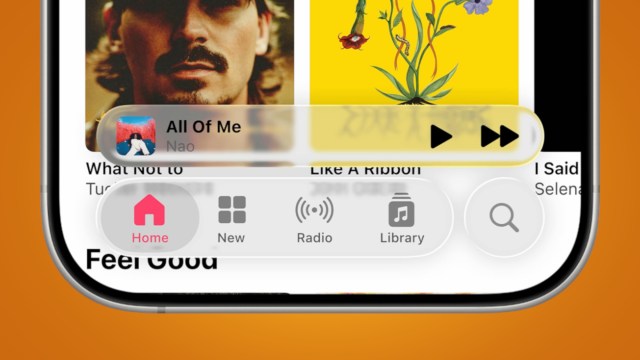
A small but potentially quite useful new feature has come to Apple Music as part of iOS 26.1, because now, when playing songs on Apple Music, you can swipe your finger across the MiniPlayer to skip to the next or previous song.
The MiniPlayer is the floating bar at the bottom of the app that shows the currently playing track, so now, if you swipe left across it, the previous track will start playing, and if you swipe right, it will skip to the next track, making the MiniPlayer a bit more useful.
4. Streamlined security

Dive into Settings > Privacy & Security > Security Improvements, and you’ll now find a toggle to automatically install background security improvements, which are small updates that “provide additional protection to your iPhone in between software updates.”
So, these updates won’t be attached to new iOS version numbers, but they will help keep your iPhone safe from threats. As such, it’s definitely worth turning this feature on.
5. A new camera toggle

Finally, iOS 26.1 includes a new ‘Lock Screen Swipe to Open Camera’ toggle in Settings. With this enabled, you’ll be able to swipe left on the lock screen to quickly access the camera, and since we’ve been able to do this for a while now, this new toggle exists more as a way to turn the feature off.
Why would you want to turn it off? Well, there are already numerous other ways to access the camera – not least the dedicated Camera Control on recent iPhones, so you might not be using this swipe gesture anyway, and it’s something that you might find you’re accidentally doing when you don’t actually want to launch the camera. So, now it’s optional in iOS 26.1.
Follow TechRadar on Google News and add us as a preferred source to get our expert news, reviews, and opinion in your feeds. Make sure to click the Follow button!
And of course you can also follow TechRadar on TikTok for news, reviews, unboxings in video form, and get regular updates from us on WhatsApp too.

After numerous betas, the finished version of iOS 26.1 has now officially landed, so it should be available to download on your iPhone. You’ll find it by heading to Settings > General > Software Update. And while this isn’t as big an update as iOS 26 was, there are a…
