Google’s Circle to Search could soon protect you from fake AI-generated images

As is the trend for most AI-infused products these days, Circle to Search is expanding – again. The feature, which premiered on the Galaxy S24 series in January of this year and then rolled out to other Android devices, allows you to simply circle something on screen – be it an amazing slice of cheesecake while scrolling through Instagram, or the next fashion item – and get search results for it.
Now, Google is expanding Circle to Search to include a version of this handy tool. You can still circle anything you’d like on the screen, but if you’re looking for intel on an image, it can now add additional context and even look into the metadata, which could tell you the type of camera it was shot on and even when it was created or exported.
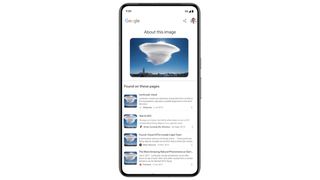
Further, though, ‘About This Image’ promises to tell you if it’s an AI-generated image containing some invisible pixels, although there is a catch here: the image needs to have Google‘s DeepMind Synth Watermark.
Along with identifying that hidden watermark or the metadata, you’ll see more context around the image. In an example of a cloud that looked like a UFO, the search returned results from other sites that had that same image or one similar to it; in this case, that’s news sites that provide the context. It wasn’t a UFO, but rather a very unique-looking cloud. To a degree, it’s nice to see Google relying on publishers to provide the context rather than an AI-generated chunk of copy.
Still, it’s nice to see Google expanding the capabilities of Circle to Search, and adding a feature that you might already have some experience with. The rollout of this feature begins today (July 31), so it might not be available on your device immediately. If your Android device, like a Pixel 8 Pro, Galaxy Z Fold 6, or countless others, supports Circle to Search, you might see it immediately, and you can also use it within Google Lens on Android or iOS.
The integration with Google Lens rolls this out to be a bit more people, and there, you can either take a photo of something or upload a screenshot of the image in question rather than circling it. Either route, ‘About This Image’ within Circle to Search, is supported in 40 languages worldwide.
You Might Also Like

As is the trend for most AI-infused products these days, Circle to Search is expanding – again. The feature, which premiered on the Galaxy S24 series in January of this year and then rolled out to other Android devices, allows you to simply circle something on screen – be it an amazing…
