If you’re a lover of to-do list apps, there’s a good chance you miss Wunderlist. A decade ago — when apps that were both useful and delightful were even harder to come by — Wunderlist was both full of useful features and whimsical in a way few apps manage. The app had nice animations, beautiful backgrounds, worked across platforms, and offered all kinds of organizational features. It was The Verge’s favorite to-do list app.
Wunderlist’s creators are back with a nifty new to-do app

Then, long story short, Microsoft bought it in 2015, morphed it into Microsoft To Do (a very good and much less delightful tasks app), and killed Wunderlist forever. But a group of the folks who made Wunderlist in the first place, led by co-founder Christian Reber, set out to bring its spirit back to life.
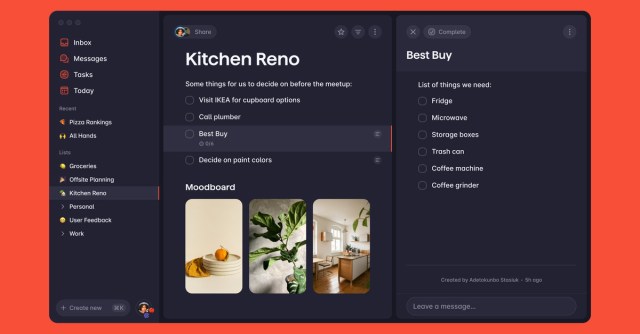
Three years later, that team is releasing Superlist, a new app mixing task management with notes and lists of all sorts. It’s available now for Mac, iOS, Android, and the web. I’ve been using it for a while in beta, and while it’s not exactly the lovely straightforward to-do app that Wunderlist was, it’s made with a lot of the same sensibility — and is even nicer to look at.
More than a tasks product, Superlist is a lists product: you make a list for a project, share it with your team, and then fill it with all the notes, files, tasks, images, and whatever else is associated with that project. The app then automatically recognizes and organizes your tasks, so you get a “Today” list with everything from every project that you need to deal with today. There’s also a toggle for switching from personal to professional tasks, so you can manage everything in one place without managing everything at the same time.
You can do everything inside of Superlist, or connect the app to Gmail, Slack, GitHub, and a few others, and automatically pull in or push out tasks to their right place. (One thing I’ve enjoyed is starring an email to turn it into a Superlist task; it’s a handy way to make sure I actually reply to the stuff that matters.) There are some integrated AI features to help turn messages into tasks, too, as Superlist tries to figure out what matters most in everything you pipe into the app.
The app’s concept is really clever, actually: a strict to-do list app often doesn’t feel like the right way to manage projects and all the stuff involved with them, but tools like Notion can be too full of features and ideas. Superlist is right down the middle, with lots of things you can do but only one system. You can make any kind of list you want, but it’s just lists all the way down. Plus the app is full of design touches that would make any Wunderlist lover proud: the horizontal rule is a hand-drawn squiggle, each list gets a custom image, even the animation when you check off a task is oddly satisfying.
It’s still a very new app, though, and is missing some fairly basic features. There are way too many clicks to set repeating tasks, the app is lacking in export options, and there are plenty of obvious integrations not currently supported. (Including, ironically and somewhat hilariously, Microsoft 365.)
Superlist is a business product first and foremost, meant to be used by teams at work. (Given how clearly dissatisfied Reber and co. were with the Microsoft acquisition, you can imagine why it would want a solid business model from the beginning this time.) Its Pro account is $8 per month per user, and lets you have more collaborators, more uploads, more AI, and more integrations. The free account will actually be enough for most people, though, especially those using it solo.
Building a great to-do list app is hard. Building two in a row is even harder, and the Superlist team looks like it’s on the way. Building a sustainable one that can avoid being buried inside some overly managed corporate app? That’ll be the hardest task.
If you’re a lover of to-do list apps, there’s a good chance you miss Wunderlist. A decade ago — when apps that were both useful and delightful were even harder to come by — Wunderlist was both full of useful features and whimsical in a way few apps manage. The app…
