Windows Recall will no longer be enabled by default on Copilot Plus PCs – here’s what you need to know

Windows Recall has proven to be a highly controversial AI feature ever since it was first announced in May. What it does is it constantly takes screenshots of everything you do on your PC and then places the images into a searchable on-device database. And yes, that includes pictures displaying sensitive information.
People were quick to call it a “security nightmare” after Microsoft openly admitted the software would not hide “passwords or financial account numbers.” The company attempted to defend its decision but has recently decided to make multiple safety improvements to Recall before its quickly approaching June 18 launch.
Arguably, the most important of these changes is that Recall will no longer be turned on by default upon activating your PC. According to a recent post on the Windows Experience Blog, the feature will instead be off by default, meaning you’ll have to enable it yourself during a computer’s setup process.
Next, enrolling into Windows Hello is now a requirement to activate Recall and to view your screenshot timeline. This means you’ll have to authenticate yourself as the primary user through a biometric input or PIN before accessing the feature.
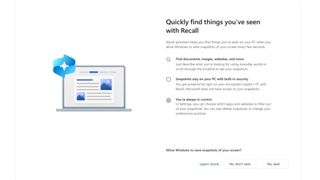
As for the final update, Microsoft is beefing up security by adding extra “layers of data protection [including] ‘just in time’ decryption” from Windows Hello ESS (Enhanced Sign-in Security). As a result, snapshots can only be viewed whenever a user proves their identity. Additionally, Recall’s search index database is now encrypted.
What’s strange is this suggests the database that would’ve stored images containing bank account numbers was initially unprotected and vulnerable to outside forces. It may surprise you to hear how unsafe it was, but at least they’re fixing it before launch and not after.
Analysis: Remaining skeptical
The rest of the blog post reiterates the security functions of Windows Recall that were previously known. For example, snapshots will be stored locally on your computer and not uploaded to Microsoft servers. An icon representing the feature will sit in the system tray, “letting you know when Windows is saving” images. Plus, users can “pause, filter, [or] delete” snapshots whenever they want.
Microsoft also stresses that Recall will only be available on the upcoming Copilot Plus PCs since they have robust security to ensure privacy.
Does this mean we can totally trust Windows Recall to maintain data security? No, not really.
Jake Williams, VP of R&D at the cybersecurity consultancy Hunter Strategy, told Wired he “still sees serious risks [as well as] unresolved privacy problems.” People could be hit with a subpoena forcing them to cough up PINs to gian access to Recall databases.
Although Microsoft claims it can’t see snapshots, who’s to say the tech giant can’t change its mind a year or two down the line and decide to harvest all that sensitive information. They may find some legal loophole giving them carte blanche to do whatever they want with Recall data. It’s scary, though.
If you’re looking for ways to improve your online security, check out TechRadar’s massive list of the best privacy tools for 2024.
You might also like

Windows Recall has proven to be a highly controversial AI feature ever since it was first announced in May. What it does is it constantly takes screenshots of everything you do on your PC and then places the images into a searchable on-device database. And yes, that includes pictures displaying…
