Windows 11’s modern File Explorer UI and RGB lighting controls head to testers

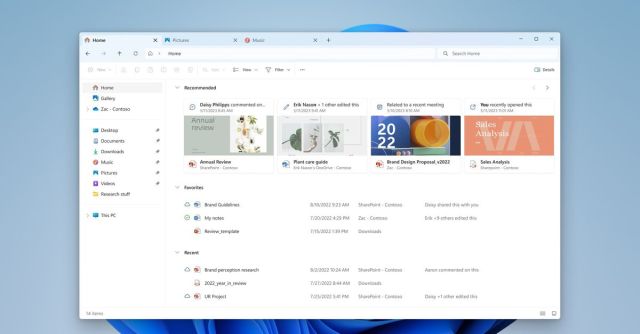
Microsoft has started testing its new modern File Explorer UI for Windows 11 alongside built-in RGB lighting controls. The updated File Explorer UI includes a modern home interface with large file thumbnails and a carousel interface that can surface recent files and favorited ones.
The subtle changes to the File Explorer UI here make it blend more closely to the overall Windows 11 design language, with a refreshed address bar and search box. “The new address bar intelligently recognizes local vs. cloud folders with built-in status,” says Brandon LeBlanc, senior program manager at Microsoft. “For OneDrive users, you’ll notice the address bar now contains your OneDrive sync status and quota flyout.”
Alongside the File Explorer changes, Microsoft has also started testing its built-in RGB lighting support. Known as Dynamic Lighting, this Windows 11 feature will control RGB lights using the open HID LampArray standard.
Acer, Asus, HP, HyperX, Logitech, Razer, and Twinkly have all partnered with Microsoft on this Dynamic Lighting feature, which allows Windows apps to control devices as well as the Settings section of Windows 11. “Microsoft seeks to improve the RGB device and software ecosystem for users by increasing interoperability of devices and apps,” says LeBlanc.
Windows 11 testers can try out an early implementation of Dynamic Lighting, but Microsoft warns there are several issues with wireless devices, so it’s recommending wired connections right now. A large list of Razer keyboards are supported right now, alongside most Razer mice. Support for Asus keyboards and mice is coming soon.
Other top PC gaming brands like Corsair, SteelSeries, MSI, and NZXT are absent from the current support list, but Microsoft says additional LampArray devices are shipping in 2024, so future products from other manufacturers could be supported eventually. Hopefully, Microsoft’s push here will fix the fragmented state of RGB lighting on PCs, with multiple apps for different lights all trying to take control of devices. OpenRGB has been a good alternative so far, but with Microsoft working closely with partners, it should guarantee improved support.
If you’re interested in trying out the new File Explorer UI or Dynamic Lighting features, you’ll need to be a Windows Insider running the latest Dev Channel release of Windows 11. Microsoft will likely roll these new features out to all Windows 11 users later this year.
Microsoft has started testing its new modern File Explorer UI for Windows 11 alongside built-in RGB lighting controls. The updated File Explorer UI includes a modern home interface with large file thumbnails and a carousel interface that can surface recent files and favorited ones. The subtle changes to the File…
