Windows 11 just got a huge new feature for the stylus, finally catching up with Apple’s iPad


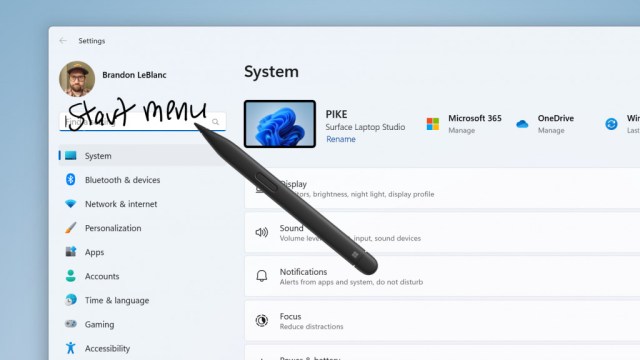
Windows 11 has implemented a major change for those who use a stylus, allowing for writing directly in the operating system’s interface and menus – though this is still in testing right now.
The move comes in preview build 23481 in the Dev Channel, where Windows Ink has been bolstered to allow for writing with a pen directly into, say, the search box in Windows 11.
The eventual goal, Microsoft notes in its blog post introducing the preview build, is to make it so you can write anywhere in Windows 11 with your pen. A further change has been applied to increase the accuracy of handwriting recognition, and also to bring in a ‘scratch out’ gesture to allow you to quickly edit (delete) text.
The catch is that so far this feature only supports English (US), but Microsoft assures us more languages are in the pipeline.
On top of this, build 23481 tweaks File Explorer to remove a bunch of outdated folder options. This is part of cleaning up this section of the interface ahead of a major revamp which is inbound for File Explorer, as you may have seen.
Finally, Microsoft has introduced a new Focus Session widget which allows users to quickly trigger (or halt) a session from the widget panel. And naturally, there’s the usual raft of minor tweaks, fixes, and known issues with this preview build as detailed in the full blog post.
Analysis: Playing catchup with Apple
The ability to write directly in the interface throughout Windows 11 is obviously going to be a major boon, but it’s a feature that is very much playing catchup with Apple. You may recall that Apple brought in its similar Scribble functionality with the Apple Pencil in iPadOS 14, which was released three years ago – so Microsoft has been slow to come to parity in this respect.
Not every Windows 11 tester will see the new Windows Ink capability either, as it’s a limited rollout to begin with, as Microsoft gauges early feedback. There are a number of known issues with the feature right now. (If you want to turn it on, you’ll find it in Settings > Bluetooth and devices > Pen and Windows Ink, where there’s a ‘Shell Handwriting’ option – though not for everyone yet, as noted).
Speaking of phased feature rollouts, preview build 23481 witnesses the completion of a few of these. That includes ‘never combined’ mode for the taskbar, and the ability to tear out (or merge) File Explorer tabs, both of which are now available to all Windows Insiders in the Dev channel.
For us it’s great to see ‘never combined’ making good progress in testing, so surely that’ll be in the mix for the release version of Windows 11 later this year (and there’s every chance the same will be true for the new Windows Ink feature).
Via XDA Developers
Windows 11 has implemented a major change for those who use a stylus, allowing for writing directly in the operating system’s interface and menus – though this is still in testing right now. The move comes in preview build 23481 in the Dev Channel, where Windows Ink has been bolstered…
