This cool Mac app could transform the notch on your MacBook Pro or MacBook Air into an iPhone-style Dynamic Island

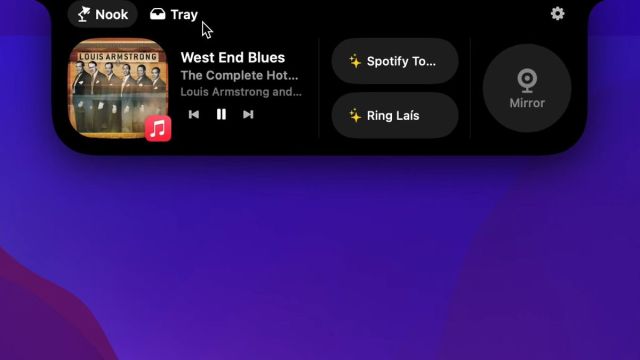
The Dynamic Island was one of the most anticipated features of the iPhone 14 Pro and iPhone 15 when it was originally announced, and it has become an incredibly helpful feature I now can’t live without. While I am waiting for Apple to introduce the Dynamic Island to Mac, NotchNook is already on the case.
You can download NotchNook and try it out for free for two days. Once the trial is over, you can subscribe for $3 a month or buy it outright for $25 and honestly, I think it’s worth it if you already rely on your iPhone’s Dynamic Island. If you’ve been living under a rock for the last few years and need a refresher as to what the Dynamic Island even is, don’t fret.
The Dynamic Island acts as your hub for in-progress background activity and notifications like audio output controls and alerts. If you have an iPhone 14 Pro, Pro Max, or any iPhone 15 model, your front camera notch tracks your timer, switches your songs or podcasts, and tracks your cheeky takeout deliveries.
This makes it an incredibly helpful hub of information that you can access in the middle of any task and quickly access apps and tasks without having to search for them. Since the feature is triggered automatically, you can start multitasking within seconds without additional actions.
Don’t wait for Apple
Even if you don’t rely on the feature, it makes a lot more sense (to me anyway) to have the Dynamic Island on your laptop for quick access to your media settings or shortcuts, and makes the controversial camera notch that comes with modern MacBooks a heck of a lot more useful.
I’m a big fan of little tools and features that make my life even a smidge easier, which explains why I’m such a big fan of the iPhone Mirroring feature coming to macOS Sequoia. When you install NotchNook, you’ll be able to move your mouse up towards your MacBook’s FaceTime webcam notch and it will expand into a Dynamic Island-like menu as it would on your phone, displaying media controls and shortcuts that you can set yourself. For example, you can set your favorite playlists or podcasts or open an app you use frequently.
NotchNook also has a lot of customization options to go along with your own shortcuts, including the ability to change the layout and even control how big the notch gets.
If you don’t have a notch on your device or you use a Mac mini like me, don’t fret! The app creates an artificial notch up top that blends in seamlessly with the rest of your display. So, on my monitor, I have a nice little Dynamic Island that lets me quickly shuffle between music or tabs between Slack.
I’m a bit wary about paying for apps that just add features that you could argue should have been included in the operating system, to begin with, but at least you can test it out for free beforehand – and if you find it useful, it makes more sense to buy the app outright (and you can get a discount for posting about the app on social media!).
Hopefully once macOS Sequoia makes its official debut later in the year we may eventually see Apple introduce a Mac Dynamic Island in its own right. Until then, I’ll be rocking with NotchNook.
Via The Verge
You might also like…
The Dynamic Island was one of the most anticipated features of the iPhone 14 Pro and iPhone 15 when it was originally announced, and it has become an incredibly helpful feature I now can’t live without. While I am waiting for Apple to introduce the Dynamic Island to Mac, NotchNook…
