The Flexbar resurrects the MacBook Pro’s Touch Bar as a standalone device

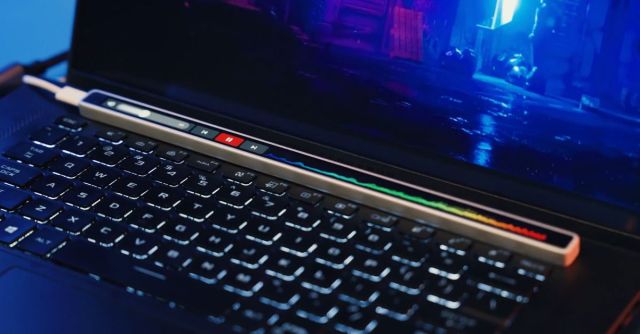
Apple may have said goodbye to the MacBook Pro’s Touch Bar last year, but a team of four engineers believes the concept deserves a second chance. They’ve created the Flexbar, which is essentially a standalone version of the MBP’s thin touchscreen display that can be used with multiple devices and platforms through a USB connection.
The Flexbar’s creators have started a new company, Eniac, which is attempting to bring the accessory to consumers through a Kickstarter crowdfunding campaign. The earliest backers can preorder one discounted to $119 from the full MSRP of $179, with delivery expected as early as February 2025.
This is the company’s first product, however, and while they have demonstrated functional hardware in several videos, there’s still an element of risk when backing it. The company told The Verge it was sourcing “components through standard supply channels,” but didn’t confirm where the Flexbar’s uniquely-sized 10-inch 2K OLED screen was coming from. Ideally it’s not repurposing Apple’s Touch Bar screens, which have a limited supply stock.
So what makes the Flexbar worth using when Apple failed to make its Touch Bar a compelling feature? As a standalone device, the Flexbar can be used with desktops or laptops running Windows or macOS, or mobile devices like a tablet. It can also be positioned however you need, either sitting at the top of a keyboard, or on its own magnetic stand.
Like Apple’s Touch Bar, the Flexbar provides dynamic access to user interface elements like shortcuts, playback controls, and various tools, which change automatically as you switch between apps. When used with image editing apps like Adobe’s Photoshop, for example, the Flexbar can be positioned vertically to replicate the familiar layout of the app’s main toolbar, allowing an artist to switch between tools or brush settings without having to reposition their stylus.
The Flexbar’s creators are also striving to offer more customizability than Apple did with its Touch Bar. You can already download an early release version of FlexbarDesigner, its Windows app (a macOS version is still in development), allowing you to create your own buttons, shortcuts, and custom interface elements through a streamlined drag-and-drop interface. There’s also a JavaScript-based SDK available for the Flexbar, allowing developers to create plugins for various apps that will be available through a marketplace that’s expected to launch sometime next year.
Apple may have said goodbye to the MacBook Pro’s Touch Bar last year, but a team of four engineers believes the concept deserves a second chance. They’ve created the Flexbar, which is essentially a standalone version of the MBP’s thin touchscreen display that can be used with multiple devices and…
