The ChatGPT search Chrome extension is the best way to use it: here’s how to find and install it

- There’s a Google Chrome extension to ChatGPT search that makes using it so much better
- It’s easy to install and here we show you how
- Sam Altman, CEO of Open AI, calls it “really good”
ChatGPT search, a brand new search engine embedded into the popular ChatGPT chatbot, is already changing the way people search the web, but you can make it even easier to use by using its Chrome extension.
ChatGPT search is fast, accurate, and there are no ads. Unlike Google, it treats search more like a conversation, so you can ask it to search for something, then refine your search with follow up prompts and ChatGPT search will keep the original context of your search going. Lance Ulanoff, editor at large here at TechRadar, was so impressed with ChatGPT search that he said, “I might never Google again”.
Of course, everything in life comes with a downside, and with ChatGPT search there’s currently no way to get access to it unless you were on the original waitlist, or you pay for ChatGPT Plus, which costs $20 (about £16 / AU$30) a month. If you were on the original wait list for it then you’ll get it now, even on the free tier.
The only other negative is that unless you are using the app, you have to fire up ChatGPT in your web browser to get to the search option. It’s accessible by clicking the search icon, which functions like a toggle switch, inside the prompt bar. With it set to ‘on’ you are using ChatGPT search.
However, there is a way around having to load up ChatGPT’s website before searching in Chrome, and that’s by using the Google Chrome extension, which means you can search using ChatGPT search by typing directly into your browser’s address bar.
The Google extension is indeed a much better way to use ChatGPT search, but the problem with Google extensions is that it’s really hard to find, so here’s the link directly to it.
Installing the extension
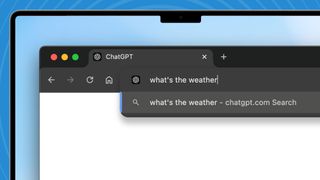
Go to the ChatGPT search extension page, then click the blue ‘Add to Chrome’ button and confirm the installation once prompted. That’s all there is to do. Now when you start typing in the address bar you’ll be searching with ChatGPT, not Google.
You can turn the ChatGPT search extension on and off by going to the Window menu in Chrome and selecting Extensions. You’ll see an on/off toggle for the extension here.
If you need even more convincing to install the Google Chrome extension then listen to Sam Altman, CEO of OpenAI.He recently posted on X that the Chrome extension is the best way to use ChatGPT search.
“Hey I’m really sorry to keep hyping our own product but you really should get ChatGPT plus and install the Chrome extension for search,” Altman wrote. “I am cheerfully the first to admit when we ship something that isn’t very good, but this time it’s… really good.”
If the CEO of the company is suggesting this as the best way to use his product, then that’s a pretty strong recommendation.
You might also like…
There’s a Google Chrome extension to ChatGPT search that makes using it so much better It’s easy to install and here we show you how Sam Altman, CEO of Open AI, calls it “really good” ChatGPT search, a brand new search engine embedded into the popular ChatGPT chatbot, is already…
