Quest owners can use Word, Excel, and PowerPoint in VR, but do you really want to?

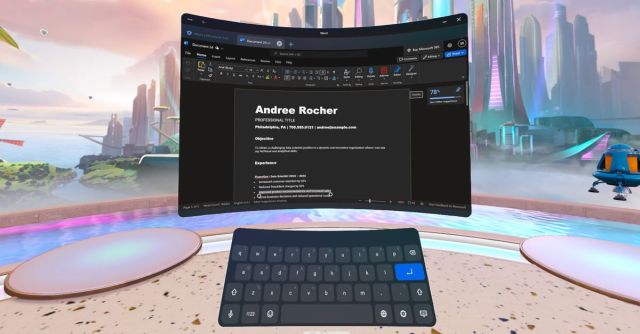
Microsoft’s Word, Excel, and PowerPoint are now available to download for free on Meta’s Quest VR headsets, as reported by Android Central. They appear to be the web versions of the apps, so while there’s a lot that’s very familiar about them, after giving the apps a whirl from inside a Quest 3, I can tell you that the virtual office experience still has a few quirks.
The first hurdle is logging in. While you don’t need a paid Microsoft 365 account, when I opened up Word, I had to log in by typing my long Microsoft account password. (The option to log in with a security key failed when I tried it; the other choices were to log in with a GitHub account or a company account.) Since I don’t have a Bluetooth keyboard lying around, that meant I had to manually type in every single character using the Quest 3’s Touch Plus controllers and the on-screen keyboard.
To make that process easier, I pasted my password into a document on my laptop, blew up the font, and used the Quest 3’s full-color passthrough to see my laptop’s screen as I typed the password into Word in VR. Mixed reality!
Once I got access to Word, I found that Word on Quest looks like, well, Word. But even though it works in VR, it’s not optimized for VR, so I found myself running into a lot of trouble selecting Word’s tiny formatting icons or moving my cursor when I was using the Touch Plus. I spent about 10 minutes typing up a short document, mostly using hand tracking and the Quest on-screen keyboard. While the keyboard worked better than when I last wrote about it, it was still much slower than using even a touchscreen keyboard.
Basically, for the app to be remotely useful for productivity, it seems like you’ll need to pair a Bluetooth mouse and a keyboard. That’s not exactly surprising — physical keyboards are a great way to type things quickly! — but I was hoping for changes to make the app easier to use in VR. My experience was broadly the same in PowerPoint and Excel; good luck trying to select cells in a spreadsheet without a mouse.
If you want to try the apps yourself, you can download them for free from Meta’s Quest marketplace. (Here are links to Word, Excel, and PowerPoint.) The apps are compatible with the Quest, Quest 2, Quest 3, and Quest Pro.
Microsoft’s Word, Excel, and PowerPoint are now available to download for free on Meta’s Quest VR headsets, as reported by Android Central. They appear to be the web versions of the apps, so while there’s a lot that’s very familiar about them, after giving the apps a whirl from inside…
