Procreate’s latest iPad app aims to make animation easier for everyone

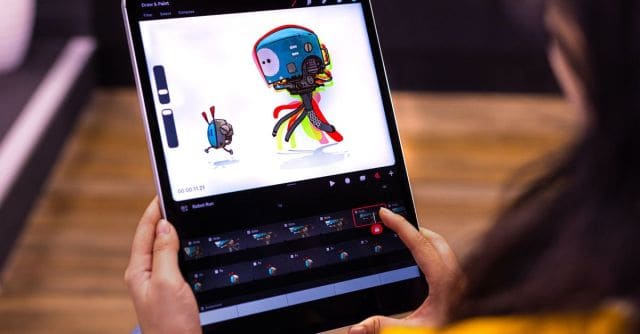
Digital illustration software company Procreate has announced Procreate Dreams, its new 2D animation app for iPad that aims to provide animation tools that anyone can use, regardless of their animating experience. Procreate Dreams will be globally available to download from the App Store on November 22nd for a one-time purchase of $19.99 — a rare sight in an industry that has widely transitioned to subscription pricing models.
Designed for touch, Procreate Dreams features tools like Performing that enable users to automatically add keyframes to a project using gestures that record the animator’s actions in real time. Procreate claims the tool will “forever change the way creatives animate” by allowing them to instantly respond to their project as it plays. A Multi-touch Timeline acts as the cornerstone of Procreate Dreams, allowing creatives to seamlessly mix drawing, cel animation, keyframing, video editing, and compositing, all with gestures that promise to be faster than using a mouse and keyboard.
The Flipbook tool is described as an “homage to traditional animation” that provides a more focused user interface, similar to the popular Animation Assist feature in Procreate’s first app. Perfect for creating short looping GIFs, complex character animation, and more. Onion skins — a technique that allows animators to see several frames at once — can be activated while painting and animating and provides options for customizing frames with different colors, opacity, and more.
For techniques like rotoscoping (which involves animating by tracing over video frames), Procreate Dreams supports importing ProRes footage up to 8K in resolution. The app also introduces a new audio engine for adding character voiceovers, atmospheric music, and other sound effects to animated projects.
Procreate Dreams supports all brushes from the original Procreate app, which have been optimized for use with the Apple Pencil. There are also larger canvases and more layers, alongside full support for files created in Procreate. That includes a new specialized Procreate file format designed for iCloud synchronization that enables 1TB files to be opened instantly with no loading, saving, or export times. These Procreate files can store a project’s entire undo history so that artists can experiment without the risk of losing their work.
Procreate seems confident that its latest app will be an “industry game-changer,” and that doesn’t sound outlandish when you look at its track record. The original Procreate illustration app definitely helped the iPad to be adopted by professional artists and hobbyists alike thanks to its powerful features and easy-to-use interface. It’s since become the bestselling paid iPad app for over six years, supported by a very dedicated user base that praises its refusal to move to a monthly subscription model as rival companies like Adobe and Clip Studio Paint have.
Digital illustration software company Procreate has announced Procreate Dreams, its new 2D animation app for iPad that aims to provide animation tools that anyone can use, regardless of their animating experience. Procreate Dreams will be globally available to download from the App Store on November 22nd for a one-time purchase…
