OpenAI Sora officially launches to change AI video – 5 things you need to know

The third day of OpenAI‘s 12 Days of OpenAI went way bigger than the OpenAI o1 model of day one or the enterprise-focused day two. The AI company announced the general release of the long-awaited Sora AI video generator.
First teased nearly a year ago, there’s a lot to unpack from the news, so here are five of the most important bits about Sora you need to know.
How to make videos with Sora
Sora is now accessible via its website to ChatGPT Plus and Pro subscribers in the U.S. and many other countries. The AI video maker employs an upgraded version of the model showcased in February called Sora Turbo – this new model produces better videos more quickly than the earlier iteration.
Beyond basic text-to-video capabilities, Sora Turbo adds some creative flexibility. You can submit a text prompt to make a video from scratch, as well as animate a still image, or remix an existing video based on a new text prompt.
Don’t expect to make full-length feature films right away, though. Sora runs on a credit system similar to ChatGPT and DALL-E. ChatGPT Plus subscribers get 1,000 monthly credits, which equals 50 videos at 720p resolution of five seconds each that will be prioritized for creation.
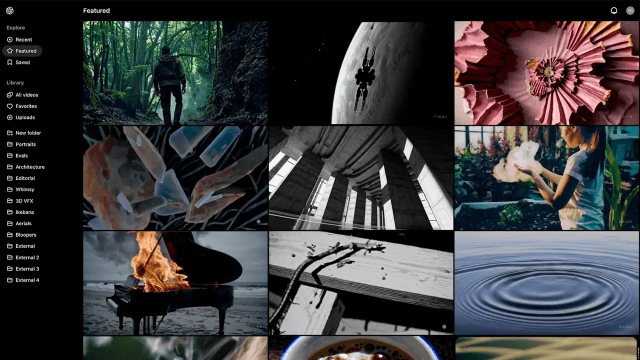
If you’re willing to pay $200 a month for the new ChatGPT Pro plan, you can get longer, higher quality videos of up to 20 seconds at 1080p and ten times as many priority videos as with Plus. You can also have up to five videos processing simultaneously. If you use up all 500 priority slots, you’ll still get unlimited video generations below the priority level, but none of the videos will have the OpenAI watermark. That’s not the case on the Plus plan, though. Even if you’re not making a video, you can check out the Sora Explore page and see what others are making.
Once you’re logged into Sora, you can follow the steps below to make a video in Sora, and check out our hands-on with making a video here.
- Visit Sora.com and log in with your ChatGPT Plus or Pro account credentials.
- Once logged in, locate and click on the “Create” or “New Video” button to open the video generation interface.
- In the text box, type a prompt for the video you wish to create.
- You can set a style pre-set and, depending on your subscription tier, you can set your resolution and duration as well.
- Click the “Generate” button and Sora will create your video.
- Once the video is ready, you can preview it and redo it or remix it with a new prompt.
Sorry UK and Europe
There’s bad news for those in the UK and Europe eager to use Sora. The AI video maker is not available there yet, and the delay has no ending in sight. It’s a familiar scenario for OpenAI products facing the region’s stringent regulatory landscape.
This cautious rollout echoes the restrictions faced by ChataGPT, including an outright ban by Italy. DALL-E’s image maker was also slow to launch in the region as OpenAI navigated the complexities of European AI governance.
Storyboarding
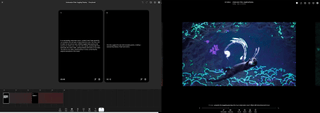
One standout element of the new Sora platform is the Storyboards feature. Basically, you can set up multiple prompts in a row to design a narrative that the AI will turn into a sequence of multiple videos that can be merged into one cohesive story.
So, say you might want to make a video explaining the water cycle. With Storyboards, you could generate a sequence showing water evaporating from a lake, condensing into clouds, and eventually falling back to earth as rain – all animated and guided by simple text prompts. You could tell all kinds of fun stories and link them together in a cohesive style rather than hoping the AI will maintain that preferred look with multiple independent prompts. You can see an example of a Storyboard below.
Blending
Another major feature of Sora is Blending. Like the Storyboard feature, Blending is about combining videos. However, while Storyboard is about linking videos across time, Blending merges two scenes through a transition that works organically with both. Sora can easily meld disparate lighting, perspective, motion, and other elements and meld them into a harmonious whole.
Say you have an AI-generated clip of a serene forest and another clip showing a busy city of the future. Blending would let you show the forest transform into the city skyline. The smooth transition could be very evocative if you’re telling a story of urbanization or perhaps of someone moving from the countryside to the big city. Even the ocean and outer space could link together, with bubbles morphing into swirling suns of a distant galaxy as you open your sci-fi movie, perhaps.
Safety and competition
Of course, the usual quality and content safety issues arise with Sora, as with any other AI video generator. That’s why videos generated with Sora will have visible watermarks unless you pay to remove them.
All of them will include metadata that can track their origin, though, so even without a watermark, a video made with Sora will be identifiable. The idea is to address growing concerns about misinformation, deepfakes, and AI manipulation. And you won’t be allowed to upload images or videos to Sora without agreeing to guidelines forbidding content involving minors, violence, explicit material, or anything copyrighted. You’ll get suspended or banned if caught.
Those restrictions aren’t unique to Sora, but they put it in the same arena as other AI video makers. There’s been an enormous burst of interest in the technology, with commensurate releases of alternatives like Runway, Stability AI, Pika, and Luma Labs’ Dream Machine, among others.
You might also like…
The third day of OpenAI‘s 12 Days of OpenAI went way bigger than the OpenAI o1 model of day one or the enterprise-focused day two. The AI company announced the general release of the long-awaited Sora AI video generator. First teased nearly a year ago, there’s a lot to unpack…
