One of iPhone’s best features is finally going to Disney World and Disneyland

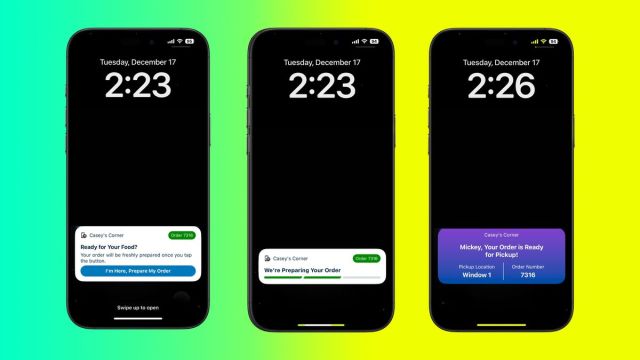
- Disney is now rolling out support for Live Activities on the iPhone.
- The enhanced feature should make getting food at Disney World or Disneyland easier.
- Like other rollouts, the Live Activities support extends to the Dynamic Island.
Disney Parks around the world are known for food, and your iPhone is about to get a lot more helpful if you’re getting the goods at Disney World in Florida or Disneyland in California. Disney is now adding support for one of the iPhone’s best features to its mobile ordering system for the Disneyland and My Disney Experience” for Disney World iOS apps.
Through Live Activities on the front of your iPhone, you’ll be able to monitor your mobile order at select locations, and without even unlocking your smartphone, you’ll be able to get your order prepped and then find the pickup location. And whether you’re craving a pretzel, a full meal, or an ice cream bar, those extra seconds can count.
Considering that Live Activities work on the lock screen or at the top of the iPhone’s screen, if you have the Dynamic Island, you’ll also be able to monitor the mobile order pickup without needing to open the app, as you can just glance at the top.
The best part, though, is that Apple doesn’t restrict Live Activities to the latest and greatest iPhone; it’s supported on any iPhone that can run iOS 16.1 or later. To get the experience at the top of your screen, you’ll need an iPhone 14 Pro or 14 Pro Max or any iPhone 15 or iPhone 16, as these feature the Dynamic Island.
As part of watchOS 11, the Live Activities from your iPhone will automatically carry over to your wrist. This means you could just glance down to select “I’m Here, Prepare My Order” or see which window your food is ready for pickup from.
This new functionality doesn’t necessarily require a fresh update for the Disneyland or My Disney Experience apps, but it’s best practice to ensure you’re running the latest version, especially if you’re visiting the parks. Both apps offer extensive functionality that can help you get even more out of your visit.
The latest addition of Live Activities support should let you spend less time on your iPhone in the parks and enjoy the experience more; it’s also a way to surface some of the most essential details directly on the front of your phone.
For instance, if there’s a snack that you’re really hoping to score or maybe it’s the latest limited edition popcorn bucket, you could lock the order in when you first arrive at the park and then from the Live Activity, select ‘I’m here’ for the cast members to begin preparing your order. It could save you a lot of hassle and make the entire experience a bit easier.
Beyond ordering food, both apps – Disneyland and My Disney Experience – make it easy to view your scheduled reservations, reserve a ‘Lightning Lane’ to access a ride quickly, view various wait times for attractions, and, perhaps most importantly, view a map of the parks.
That all remains standard here, and now Disney is rolling out support for mobile ordering via Live Activities. So the next time you’re in the parks, don’t necessarily rush to unlock and simply look to see if a Live Activity is on your lock screen.
It’ll be neat to see in what other ways Disney may look to support this iOS feature as well.
You might also like
Disney is now rolling out support for Live Activities on the iPhone. The enhanced feature should make getting food at Disney World or Disneyland easier. Like other rollouts, the Live Activities support extends to the Dynamic Island. Disney Parks around the world are known for food, and your iPhone is…
