Now Google’s Gemini AI is ready to fill in those empty cells in your spreadsheet

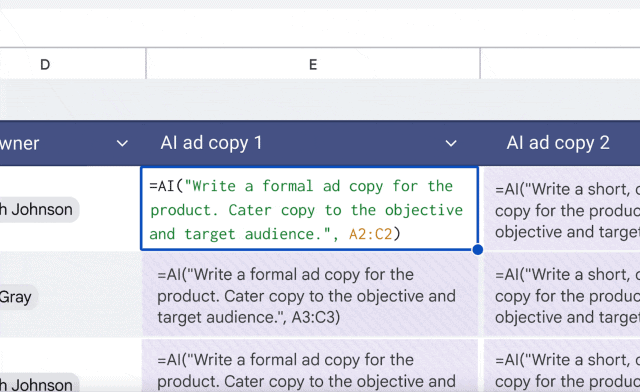
Google is launching a new AI function in Sheets to help you generate text to fill out parts of your spreadsheet. The feature, powered by Google Gemini, can reference specific cells to create text, summarize information, or categorize your data.
In the example shared by Google, you can use the new AI function to generate and tailor copy for an advertisement based on the different target audiences listed in your spreadsheet. To do this, you would highlight the cells where you want the AI copy to appear and then use this function (but make sure to change the target range to match your spreadsheet):
Another example includes using the AI function to summarize the feedback of customers listed in a group of cells, which you could perform by typing this:
You can also categorize a customer inquiry as a compliment, exchange request, or return request, or even use it to classify restaurants by location. You can check out a range of different examples for the AI function on Google’s support page.
This builds on the other Gemini-powered feature in Sheets that can answer questions about your data and even create a visualization. However, the AI function comes with some limitations, as it only supports text-based responses for now. Google notes that the AI function can’t access your entire spreadsheet or Google Drive files, and you can only generate outputs for the first 200 selected cells — you would have to wait until it finishes and then choose more cells.
AI functions are rolling out now to Google Workspace users on the business and enterprise plans, as well as for Gemini AI Pro and Ultra subscribers. It’s also available to users with the Gemini Education plan or add-on.
Google is launching a new AI function in Sheets to help you generate text to fill out parts of your spreadsheet. The feature, powered by Google Gemini, can reference specific cells to create text, summarize information, or categorize your data. In the example shared by Google, you can use the…
