Netflix explains how it’s quietly upgraded the image quality of your favorite movies and TV shows –and it’s all about film grain

- Netflix’s new AV1 Film Grain Synthesis tech boosts image quality
- It also reduces file size and improves streaming performance
- The tech has been rolling out to movies and TV shows since March 2025
Film grain is something of a ‘secret sauce’ that makes movies look, well, like movies. Go to the cinema and, while you’ll hardly notice them, these dotty imperfections flickering across the image lend it a depth that’s tricky to recreate digitally.
Well, now Netflix has revealed in a Techblog post that it’s found a better way to do it, with a new technique that also handily improves playback stability, while reducing errors and rebuffering. It’s been rolling out globally since March, with FGS-enabled streams available now on supported devices.
So what exactly has Netflix done? Movies filmed on digital cameras can appear too clean and perfect, and even digitized versions of analog films can struggle to properly retain the grain. This is particularly true for movies on services like Netflix, which require compression to reduce file size for smooth streaming performance.
In its efforts to keep things efficient, the compression process will remove grain from the original video file, meaning the viewer gets a nice steady stream but an image that lacks that true movie look.
Not anymore. Netflix has revealed that it’s rolled out a technology called “AV1 Film Grain Synthesis” (FGS), which delivers a pleasingly grainy image without increasing file size.
It’s clever stuff: FGS analyses the source video to determine its specific grain pattern and shape, estimating it by comparing the original video with a de-noised version – the difference being the grain.
It then scales the grain intensity for different scenes, adjusting it for lighting and color. This information is then streamed alongside the compressed, grain-free video file, and used to recreate the grain effect on your device.
Better picture quality, greater efficiency
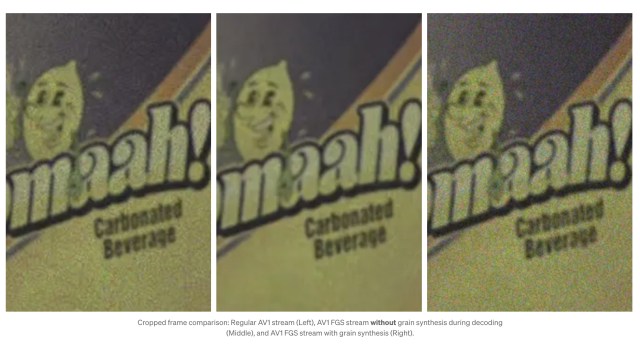
This means movies and TV shows on Netflix will now offer that desirable analog film look, boosting image quality and giving users a more enjoyable streaming experience.
Interestingly, during A/B testing of the feature Netflix also found that FGS significantly reduced bitrate and network bandwidth requirements, decreased playback errors and rebuffering, and reduced start-up delay, all of which result in a more stable overall streaming experience. Double win.
If you’re excited to see FGS in action for yourself, you’ll need a playback device that supports it. Unfortunately, it isn’t yet clear exactly which shows and movies will benefit from the tech, nor what the hardware requirements are – we’ve contacted Netflix to find out and will update this story when we hear back.
However, Netflix’s blog post detailing the roll-out suggests They Cloned Tyrone and Dept. Q are good places to start. The streaming giant says you may need to toggle off HDR from the settings menu to see those FGS streams.
You might also like

Netflix’s new AV1 Film Grain Synthesis tech boosts image quality It also reduces file size and improves streaming performance The tech has been rolling out to movies and TV shows since March 2025 Film grain is something of a ‘secret sauce’ that makes movies look, well, like movies. Go to…
