Microsoft’s Xbox PC launcher gets going with Steam, Epic, and other games showing up

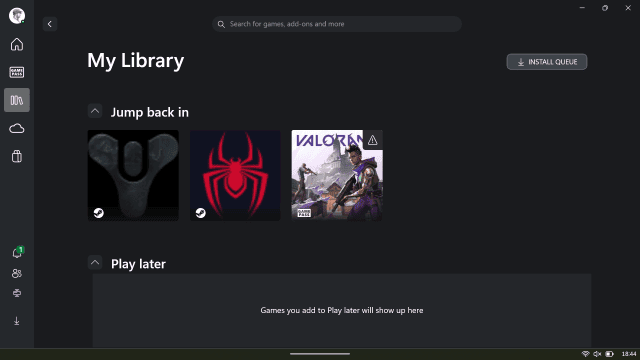
Microsoft announced earlier this week that it would start testing its new aggregated gaming library on the Xbox app for Windows, and it’s now starting to show up for testers today. This new library experience lists Steam, Battle.net, Ubisoft, Epic Games Store, and Riot Games titles that are all installed on a PC from various other launchers — much like GOG Galaxy.
I’ve been trying out the experience today and found that Microsoft automatically detects installed games and lists them in your library in the Xbox app, along with a relevant thumbnail or icon, and the name of the launcher where the game was installed from. While the thumbnails could do with some work in this beta app, you’ll get an option to play the game or see it in the relevant launcher. You can also hide games from these different PC stores if you don’t want to see them listed in the Xbox app.
This integration simply lists the games and you won’t get Xbox achievements or any additional functionality in these titles. The consolidated library is part of Microsoft’s effort to make the Xbox app on Windows the home of PC gaming, and to improve the handheld experience of Windows.
Speaking of Microsoft’s work to improve the Windows handheld experience, I’ve had multiple people tip me this week that the “Xbox full-screen experience” settings have randomly appeared on their existing ROG Ally devices. While the settings have appeared, the experience isn’t live yet and nothing happens if you try to enable it.
Microsoft confirmed to The Verge earlier this month that existing devices like the ROG Ally will get this full-screen Xbox experience at some point soon, and it looks like the company is already starting to test that on some devices. I’m confident this is a bug showing the settings, as the new ROG Xbox Ally devices aren’t due until later this year and they’ll launch with this new experience first.
If you’re interested in testing the new consolidated library you don’t need to wait until later this year. You just need to have the Xbox test app installed, which is as simple as downloading the Xbox Insider Hub on PC, joining the PC gaming preview in the app, and then updating the Xbox app in the Microsoft Store.
Microsoft announced earlier this week that it would start testing its new aggregated gaming library on the Xbox app for Windows, and it’s now starting to show up for testers today. This new library experience lists Steam, Battle.net, Ubisoft, Epic Games Store, and Riot Games titles that are all installed…
