Microsoft tests Windows Ink upgrade that lets you write anywhere you can type

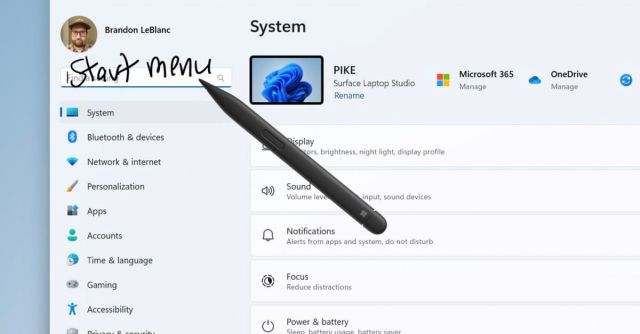
Microsoft is dropping a new Windows 11 preview build for Insiders in the Dev Channel, and it has a new feature that enables handwriting entries directly into fields throughout the OS. Previously, handwriting-to-text conversion largely worked in certain software, like OneNote, or within a special handwritten text recognition box.
The new Ink feature also includes improved text recognition from handwriting and a scratch-out gesture feature that helps users fix a mistake. While Microsoft has only enabled this feature for US English, other languages are on the way.
Microsoft is rolling out the upgraded Windows Ink feature to users on Preview Build 23481, but it won’t be available immediately to everyone, even if they’re in the Dev Channel. You can check to see if it’s available by going to Settings > Bluetooth and devices > Pen and Windows Ink, which is under “Shell Handwriting.”
Do be warned, since it’s in testing, there are a few known Windows Ink bugs in this build. Currently, you can’t use handwriting to erase text within Microsoft Edge — and the address box may “not work correctly,” either. Also, search boxes and comment fields in Microsoft 365 apps may be buggy too. Lastly, although you can write inside fields, you can’t convert handwriting to text within some 365 apps like Word documents and Excel spreadsheets.
If you’ve seen a feature like this before, it’s because tablet devices like iPads already support writing directly into text boxes and fields, and the native OS takes care of quickly converting it into text and entering it for you. Even budget-friendly devices like the new Amazon Fire Max 11 let users write in fields.
Microsoft is dropping a new Windows 11 preview build for Insiders in the Dev Channel, and it has a new feature that enables handwriting entries directly into fields throughout the OS. Previously, handwriting-to-text conversion largely worked in certain software, like OneNote, or within a special handwritten text recognition box. The…
