Microsoft Teams is making it easier to control your webcam and audio during meetings

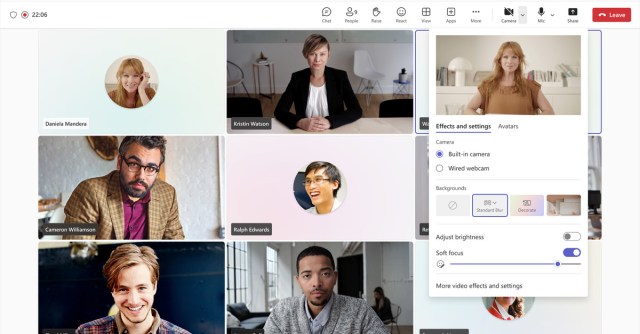
Microsoft is finally giving Teams users an easier way to control audio and video features during meetings. The software giant has started testing easily accessible tools for switching cameras, audio sources, speaker output, and much more. These new features are part of an update available for Microsoft Teams Public Preview today.
In the current version of Teams, you have to dig through multiple layers of settings to switch which camera you’re using, adjust your background, or move from a built-in speaker to a wired one. The new features allow Teams users to access a downward arrow next to the camera or mic button on the meeting toolbar, which includes simplified audio and video options.
If you want to switch from your laptop’s built-in camera to a wired webcam, you can do this quickly from this new menu or change which microphone or headset / speaker you’re using. There are also options for enabling noise suppression here, spatial audio, and virtual backgrounds. These settings were usually found in a sidebar that was accessible by digging into the settings menu.
Windows and macOS users can test these new changes today as part of the new Teams client and the Public Preview program. These features should be rolled out to all Teams users in the coming months.
Microsoft is finally giving Teams users an easier way to control audio and video features during meetings. The software giant has started testing easily accessible tools for switching cameras, audio sources, speaker output, and much more. These new features are part of an update available for Microsoft Teams Public Preview…
