Microsoft is announcing the third generation of its OneDrive cloud storage today, complete with the company’s AI-powered Copilot system, a Fluent design refresh, and big improvements to the way businesses share and use cloud documents.
Microsoft overhauls OneDrive with a big new design, AI Copilot integration, and more
OneDrive hosts trillions of files for consumers and businesses, with 2 billion files added every single day. Microsoft is now overhauling a lot of the experience of working in OneDrive for businesses, with many quality-of-life improvements that will make managing and using files a lot better on the web, in Windows, and in Microsoft’s various Office apps.
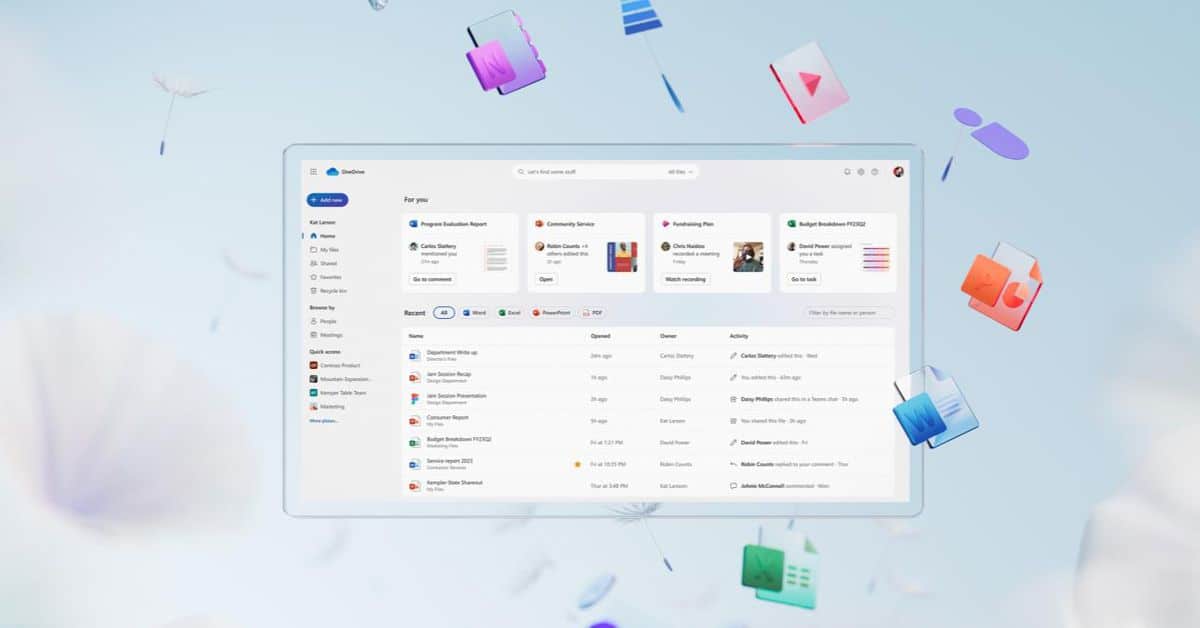
Microsoft is overhauling the main OneDrive web app with a new Fluent design. It more closely matches the Windows 11 interface and recent changes to Office apps, and it also fits in with the latest File Explorer design updates. There is now an AI-powered file recommendations “For you” section up the top, much like File Explorer.
Files that matter to your workday are surfaced here immediately and can appear here whether they’re in your OneDrive, Teams, or elsewhere. Microsoft has really updated OneDrive to make it a one-stop shop to find and manage all your files.
This updated web view also includes a refreshed shared view, which now includes all files shared over Teams, through emails, and other ways Office documents were shared with you. The main sharing UI has also been improved, and managing permissions to files has been streamlined, too.
If you work on a bunch of files with colleagues, there’s a new people view to make that a lot easier, too. You can focus on files you’re working on with colleagues just by finding their face or name. You can also filter this view by name or pin colleagues you work closely with to the top.
You can also now choose the colors of your folders, and when you share with co-workers, they will also see the color choice.
Perhaps the most useful addition is the ability to favorite OneDrive files that will roam across Windows 11, OneDrive on the web, and elsewhere. So if you favorite a OneDrive folder in File Explorer on Windows 11, you’ll find that folder in the favorites list on OneDrive on the web.
The search experience in OneDrive is also being overhauled with AI features, making it easier to find friends and family in pictures you’ve stored on Microsoft’s cloud storage service. These are being tested with consumers in a limited preview starting this month, with a public preview set for early 2024.
Microsoft has also improved file creation in OneDrive. A new “add new” button is coming next summer with a list of template suggestions for presentations and other documents, and you can hover over these to preview them or just start from a blank document.
OneDrive is also getting a lot faster to use, with improved offline support. Microsoft says OneDrive on the web launches two times faster, with instant sorting, improved scrolling, and improved offline support. You’ll soon be able to launch OneDrive in the browser, all without an internet connection. Files On-Demand is also coming to the browser version so you can mark files as available offline. Both offline mode and Files On-Demand are great features that were previously limited to the main OneDrive desktop app but are arriving in early 2024.
One thing many OneDrive business users have been asking for is the ability to open any document from OneDrive on the web into the native desktop apps. Microsoft is adding this feature in December, with the ability to open things like CAD files or PDFs. Microsoft is also adding a new media view that includes all photos and video assets in a single location.
This new OneDrive experience will also soon be available in the files section of Microsoft Teams and the file navigation part of Outlook. Microsoft expects the new OneDrive in Outlook view to be available in December.
Microsoft is also planning to integrate its Copilot AI system into OneDrive in December for everyone with a Microsoft 365 Copilot license. Copilot will offer up a daily digest of files, like a catch-up feature for documents you and your colleagues are working on. This will include a list of important changes to files and a summarized look at new comments. Microsoft says it will intelligently organize these summaries based on context and relevance.
You can try most of the interface changes to OneDrive over at onedrive.com today, with more arriving in early 2024.
Microsoft is announcing the third generation of its OneDrive cloud storage today, complete with the company’s AI-powered Copilot system, a Fluent design refresh, and big improvements to the way businesses share and use cloud documents. OneDrive hosts trillions of files for consumers and businesses, with 2 billion files added every…
