Microsoft is testing a new in-game browser

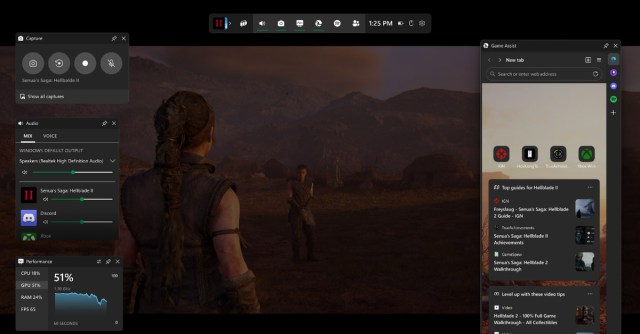
Microsoft has announced that Microsoft Edge Game Assist, a new Edge-powered in-game browser overlay, is available for beta testing in Windows 11. The “game-aware” overlay lives in the Microsoft Game Bar and is designed to automatically find and show you links to tips and guides for the game you’re playing, using the Edge browser.
Game Assist uses the profile you’re logged into in Edge, so it’ll give you access to your data, like cookies, autofill, and favorites, so “you don’t need to log into sites again.” Like other Game Bar widgets, you can pin it above your game as you play. Game Assist is currently available in English, and you’ll need to opt into the preview and set Microsoft Edge Beta 132 as your default browser to use it.
Here’s a video of the feature in action:
You’ll have to find content yourself for most games for now, but the game-aware part of Game Assist will surface information automatically for a few games, including Baldur’s Gate 3, Diablo IV, and Hellblade II: Senua’s Saga. Microsoft says it’ll be adding support for others “throughout the preview and over time.”
In a second video, Microsoft shows how the overlay looks when used to follow along with video guides:
Microsoft says it’s collecting feedback in a few ways:
You can share your feedback in Game Assist by going to Settings and more (“…”) > Send feedback. You can also vote on which features you want to see added to Game Assist using the new Game Assist Community feedback portal, and we’ll be monitoring feedback on r/MicrosoftEdge, X, and other social channels as well.
Game Assist only supports mouse and keyboard input for the moment, but Microsoft writes it’s adding support for handhelds and gamepads in the future. Compact Mode support is also coming later, the company says.
Below are Microsoft’s instructions for getting started with Game Assist.
Microsoft has announced that Microsoft Edge Game Assist, a new Edge-powered in-game browser overlay, is available for beta testing in Windows 11. The “game-aware” overlay lives in the Microsoft Game Bar and is designed to automatically find and show you links to tips and guides for the game you’re playing,…
