Marvel Rivals crosshairs: how to change and import them

Marvel Rivals crosshairs can be tweaked to suit the Hero you’re playing as, with hitscan characters like Luna Snow and Hela suiting a different kind of reticle when compared to projectile characters like Mantis and Moon Knight.
While this extra level of customization won’t be necessary for everyone, it can really help if you’re planning on taking on Marvel Rivals ranked mode. The game’s high quality of competitive modes definitely makes it stand out from its competitors and is one of the main reasons it’s already landed on our best crossplay games list.
Here’s what you need to know about crosshairs in Marvel Rivals, including info on how to change your crosshairs, as well as a selection of the best crosshairs codes to import into Marvel Rivals.
How to change your Marvel Rivals crosshairs
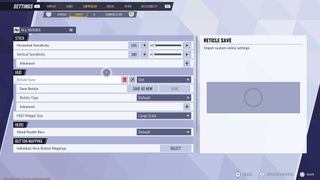
To change your crosshairs in Marvel Rivals, you just need to press pause and then select the following:
- Select “Settings”
- Scroll to “Controller” or “Keyboard”
- Select “Combat”
- Scroll down to “HUD”
- You’ll see options related to reticle, this is where you’ll customize your crosshairs
One setting to keep in mind is the “Save Reticle” option. This allows you to save different crosshairs, that can then be switched out for each Hero. To customize settings for a specific Hero, just select “All Heroes” in the top left-hand corner, and then switch to the Hero you wish to apply new settings to.
How to import Marvel Rivals crosshairs
To import crosshairs in Marvel Rivals, just navigate to the HUD settings as per the previous section. Once there, look for the “Reticle Save” option, with a dropdown menu that allows you to add new saves. Once you select this, you’ll get the option to import a code, if you’re playing on PC that is. Importing crosshairs is unfortunately not available on console.
Crosshair codes are long strings of numbers shared by other creators. Just copy these and paste them when the game asks you for an import code. This will automatically apply the correct settings, allowing you to try out other people’s recommended reticles.
Marvel Rivals crosshairs codes
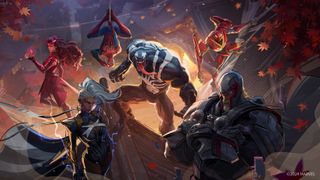
The first crosshair code we’re looking at is for Venom mains, a character focused on dive gameplay, with a mid-ranged tentacle attack as the primary fire. The code below comes from content creator Ares, and you can see their full breakdown in this YouTube video.
- Venom crosshair (Ares): 2;0.0;0.0,10.0,0.0,7.0;100.0,100.0,100.0,100.0;50.0,59.0,50.0,50.0;100.0,100.0,100.0,100.0;0.0,0.0,0.0,0.0;45.0,45.0,45.0,45.0;20.0;100.0,100.0,100.0,100.0;45.0;5,5,5,5;0.0,0.882,1.0;
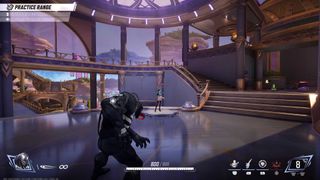
Next up is Hela, who really benefits from a Dot crosshairs style. This is to make it easier to land headshots and get rid of unnecessary visual elements. For this crosshair, just select the “Dot” option for Reticle Type. You can then Adjust the dot width, but we recommend 12. From there, try out some different colors. We went with Light Blue.
Image 1 of 2

A Dot Reticle can be very effective for Hela, who throws hitscan daggers, doing massive headshot damage.

Now, here’s a great set of crosshairs for The Punisher. We got this one from The Marvel Rivals Merchant, who has a bunch of excellent recommendations for the best crosshairs to use depending on your Hero. This YouTube video is particularly detailed, explaining the reasoning behind this crosshairs option for The Punisher.
- The Punisher (The Marvel Rivals Merchant): 4;0.0;10.0,0.0,11.0,17.0;100.0,100.0,8.0,0.0;20.0,0.0,85.0,0.0;100.0,100.0,100.0,100.0;0.0,33.0,0.0,62.0;33.0,5.0,51.0,33.0;11.0;100.0,100.0,8.0,0.0;0.0;5,5,5,2;0.0,1.0,1.0;
Marvel Rivals crosshairs FAQs
What color should my crosshairs be?
Changing the color of your crosshairs can be really helpful in Marvel Rivals. We recommend starting with a light blue or green, though, of course, this will depend on your specific eyesight and preferences. There’s plenty of customization here, making it a great extra piece of accessibility options for those looking to make the game’s readability a bit better.
Can you import crosshairs on console?
Unfortunately, you cannot import crosshairs codes if you’re playing Marvel Rivals on console. This could change in the future, but for now, the codes are simply too long to be copied over using a controller. Players on PC can copy and paste them, though we’re hoping developer NetEase adds a console-specific solution in the future.
Should I change my Marvel Rivals crosshairs?
Whether you want to change your Marvel Rivals crosshairs really depends on how deeply you want to get into Marvel Rivals. If you find yourself playing often, and you tend to stick to two or three Heroes, adding custom crosshairs for each can really help. Some crosshairs, for example, will help you see whether an enemy is within range, while others can assist with landing headshots.
You Might Also Like…

Marvel Rivals crosshairs can be tweaked to suit the Hero you’re playing as, with hitscan characters like Luna Snow and Hela suiting a different kind of reticle when compared to projectile characters like Mantis and Moon Knight. While this extra level of customization won’t be necessary for everyone, it can…
