Leica’s new iOS app transforms your iPhone into one of its cameras for free

Leica has launched a new iOS app called LUX that allows iPhones to mimic one of its cameras. The app accomplishes this in two major ways.
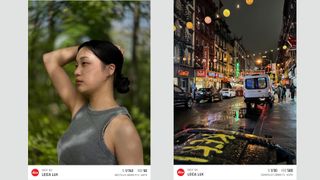
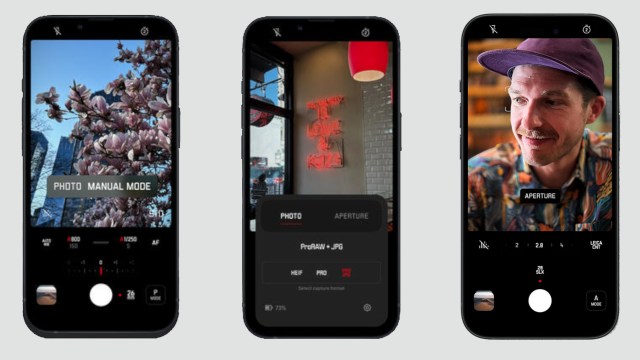
First, LUX has a feature called “Aperture Mode,” which simulates the “characteristic signatures” for a handful of Leica’s lenses. Those include the Summilux-M 28mm f/1.4 ASPH and the Noctilux-M 50mm f/1.2 ASPH.
The software houses the company’s “proprietary image processing engine,” which harnesses AI to imitate how a lens performs. This also includes replicating their bokeh effect or how a camera renders parts of a photograph that are out of focus.
It’s important to note that you cannot alter an iPhone’s aperture as it’s a fixed component. Even so, LUX gives you the freedom to control the amount of light the device’s camera takes via software.
Notable features
The other imitation method comes in the form of Leica Looks. This is a series of filters that can emulate photos taken by one of the brand’s cameras. These range from different color gradations to film presets.
For example, Vivid Look displays vibrant colors, Natural Look goes in the other direction by muting tones, and the Eternal filter saturates them. There are even several grayscale options, too. BW Natural is your standard black-and-white filter, while Blue removes all colors and applies a bluish hue everywhere.
Additionally, LUX has different shooting modes. You can opt for Automatic if you want to eliminate all guesswork in photography. Or you can elect for manual controls to fine-tune important functions, from shutter speeds to white balance. Other notable features include the ability to save photographs in the ProRAW format and “various focus options.”
LUX can be downloaded from the Apple App Store. The so-called “Freemium” model offers free access to Automatic Photo mode, Aperture Mode, and five Leica Looks filters.
However, you can purchase a monthly subscription to unlock more features. For
$6.99/€7.99/AU$9.99 per month, users gain the manual control function, five lens simulations, and all 11 Looks filters. You can also purchase a yearly subscription at $69.99/AU$99.99.
Quality concerns
As The Verge points out, and through shared images, there are some concerns regarding LUX’s quality. You’ll notice weird artifacts in the images if you look closely.
A straw from a drink has jagged edges, and a cat has lost its whiskers. They also point out that you can’t undo certain edits in some shots. In fact, users can apply Apple’s own image effects onto LUX photos, which TheVerge refers to as a “weird anachronism… guaranteed to wreck any photo.”
Granted, they had only access to a beta version of LUX, so the problems may no longer exist. The company plans on regularly upgrading its software with new filters and features, so perhaps the artifacting was quickly addressed. We reached out to Leica for clarification on the artifacts, and we’ll update this story if we hear back.
If you want to how to spruce up image, check out TechRadar’s list of the best photo editor for 2024.
You might also like
Leica has launched a new iOS app called LUX that allows iPhones to mimic one of its cameras. The app accomplishes this in two major ways. First, LUX has a feature called “Aperture Mode,” which simulates the “characteristic signatures” for a handful of Leica’s lenses. Those include the Summilux-M 28mm…
