iA Writer can now track what you or ChatGPT wrote

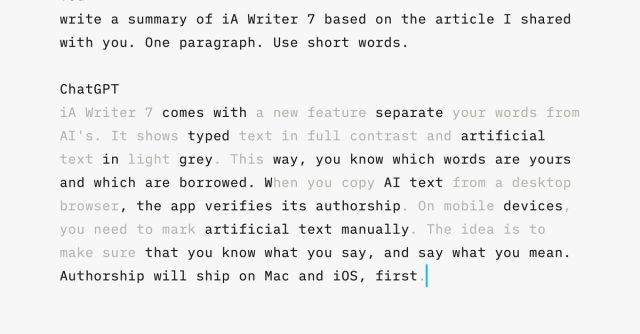
iA Writer 7, the latest version of the minimalist multi-platform writing software, has a new feature that’s designed to clearly mark text contributed by generative AI systems like ChatGPT. While your own words appear in black, you can choose for AI-generated text copied into your iA document to be greyed out. Then, as you tweak and edit the AI additions you can easily keep track of how much text is your original work and how much is artificially generated.
In its blog post about the feature, the company outlines its philosophy about using AI-generated text in writing. Rather than letting AI become a “ghostwriter” that “takes over” and makes you “lose your voice,” iA Writer’s feature is designed to encourage you to use AI “as a dialog partner” that “makes you think more and write better.”
Although there are automated elements to the authorship feature, I found it to be a largely manual process during my brief testing. “It’s up to you to decide how honest you want to be with yourself,” iA’s blog post notes. Although the software recognized my AI text when I copied it in from ChatGPT’s website on desktop, it only did so when I included the original prompt alongside ChatGPT’s response. iA Writer didn’t recognize text from ChatGPT if I only copied over the generative AI’s response without my prompt. To manually get it to appear as AI text, you can right click, select “Paste As” and then choose “ChatGPT.”
As a result, the feature is less about detecting plagiarism or watermarking AI-generated content, and more about giving creatives a tool to see the sometimes blurry line between their own words and those contributed by generative AI.
The authorship feature is only available with iA Writer’s Mac, iOS, and iPadOS apps for now, and the company says it’s planning to bring it to iA Writer’s other platforms like Windows and Android in the future. But more interesting is that iA has published the spec on Github, and says it’s open to working with other apps to “ideally” turn the feature into a new standard.
iA Writer 7, the latest version of the minimalist multi-platform writing software, has a new feature that’s designed to clearly mark text contributed by generative AI systems like ChatGPT. While your own words appear in black, you can choose for AI-generated text copied into your iA document to be greyed…
