How to cancel Windscribe and get your money back

Windscribe isn't a VPN for everybody, and it's not trying to be. Despite its high-achieving free plan, it didn't quite make my list of the best VPNs, largely due to alienating interface choices and swingy download speeds. Its iconoclastic approach to everything from design to pricing to its online knowledge base will likely win some customers for life and turn others off.
For those in the latter camp, I've written up this guide for cancelling Windscribe. Follow the instructions below to stop Windscribe from auto-renewing, cancel third-party subscriptions, delete your account altogether and get a refund.
The most important thing to know before we start is that Windscribe's money-back guarantee only lasts seven days — if you paid for a subscription, you have to cancel before then to get a refund. It's a tighter period than most VPNs, so be ready to decide fast.
How to stop your Windscribe Pro subscription renewing
To cancel Windscribe Pro, simply stop your payment method from automatically renewing for the next subscription period. Once you've done this, you can continue using Windscribe Pro until the end of the current period, then you'll be downgraded to the free version. Here are the steps to follow.
In your browser, navigate to windscribe.com. Click the words My Account at the top of the home page.
Scroll down to the billing section. On the subscription line, click the button marked Cancel Subscription.
You'll be taken to a new page. Enter your password in the Your Password field. Below, enter a reason for cancellation (this can be "none" or possibly "suck it," which Windscribe should approve of).
Click the Cancel Subscriptions button at the bottom of the page to end automatic renewal on your account.
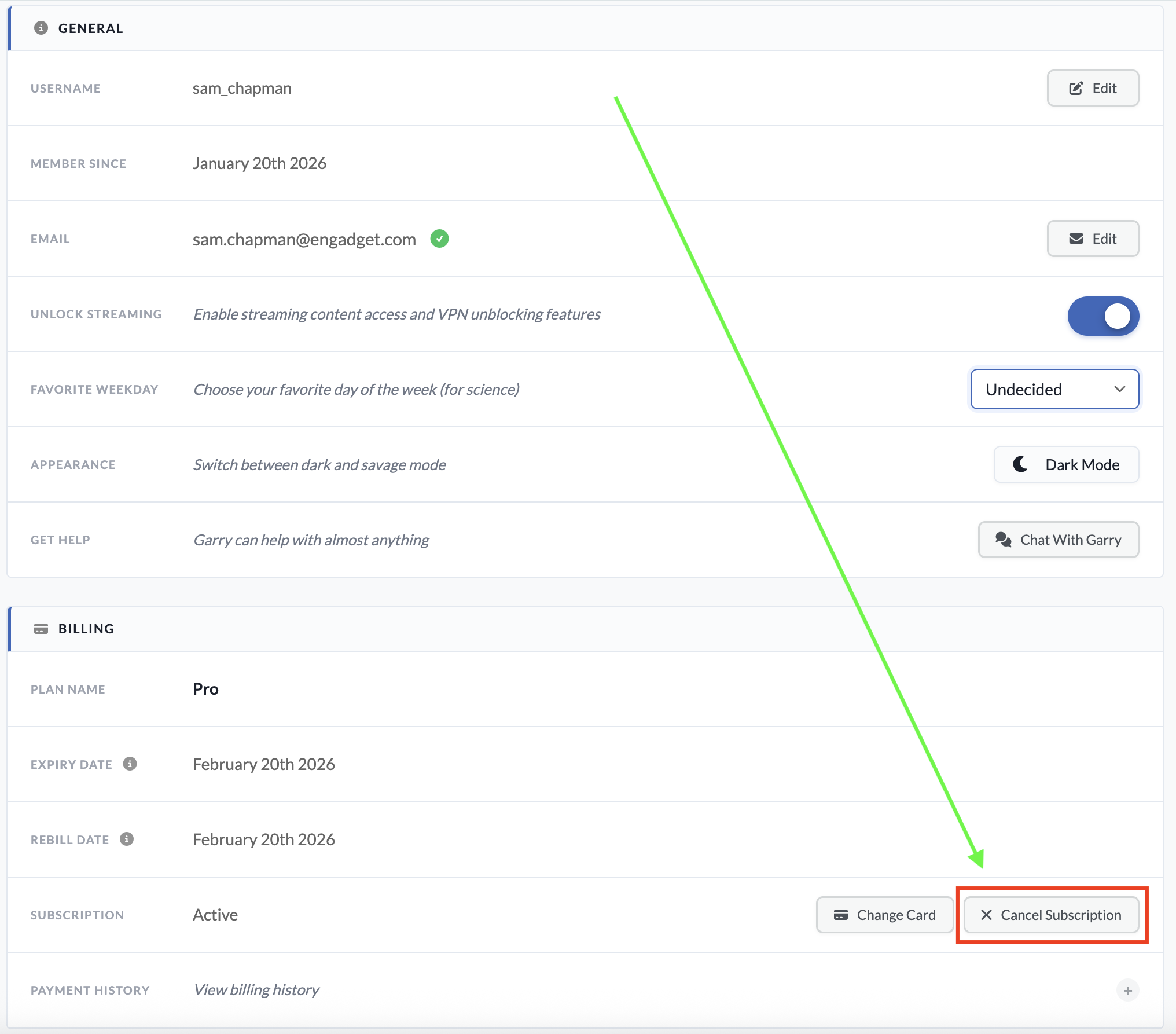
If your account also included a static IP subscription, there's no way to cancel that through the usual dashboard. You'll have to submit a support request by asking the Garry chatbot, which can be accessed by clicking the icon at the bottom-right corner of any page on windscribe.com.
When you subscribe to an app through a third party like the Apple App Store or Google Play Store, that same third party also handles cancellations and refunds. Windscribe itself won't be able to do anything for you here.
If you subscribed through Google Play on an Android phone, you can cancel by opening the Google Play Store app and tapping your profile icon at the top-right (a circle with the first letter of your username inside). Tap Payments & Subscriptions in the menu that appears, then subscriptions on the next page. Find your Windscribe subscription, tap it and click Cancel Subscription to end payments.
If you went through the App Store on an Apple device, open the Settings app, then tap on your name at the top of the screen. Tap Subscriptions and scroll down to your Windscribe subscription. Tap it, then tap Cancel Subscription.
How to delete your Windscribe account
If you're certain you want to stop using Windscribe and never start up again, you can scrub your presence from its servers by deleting your account. To do this, go to windscribe.com and click the My Account button in the header bar. Scroll all the way to the bottom and click on the obnoxiously titled Give Up On Privacy button. This will show you the following image.
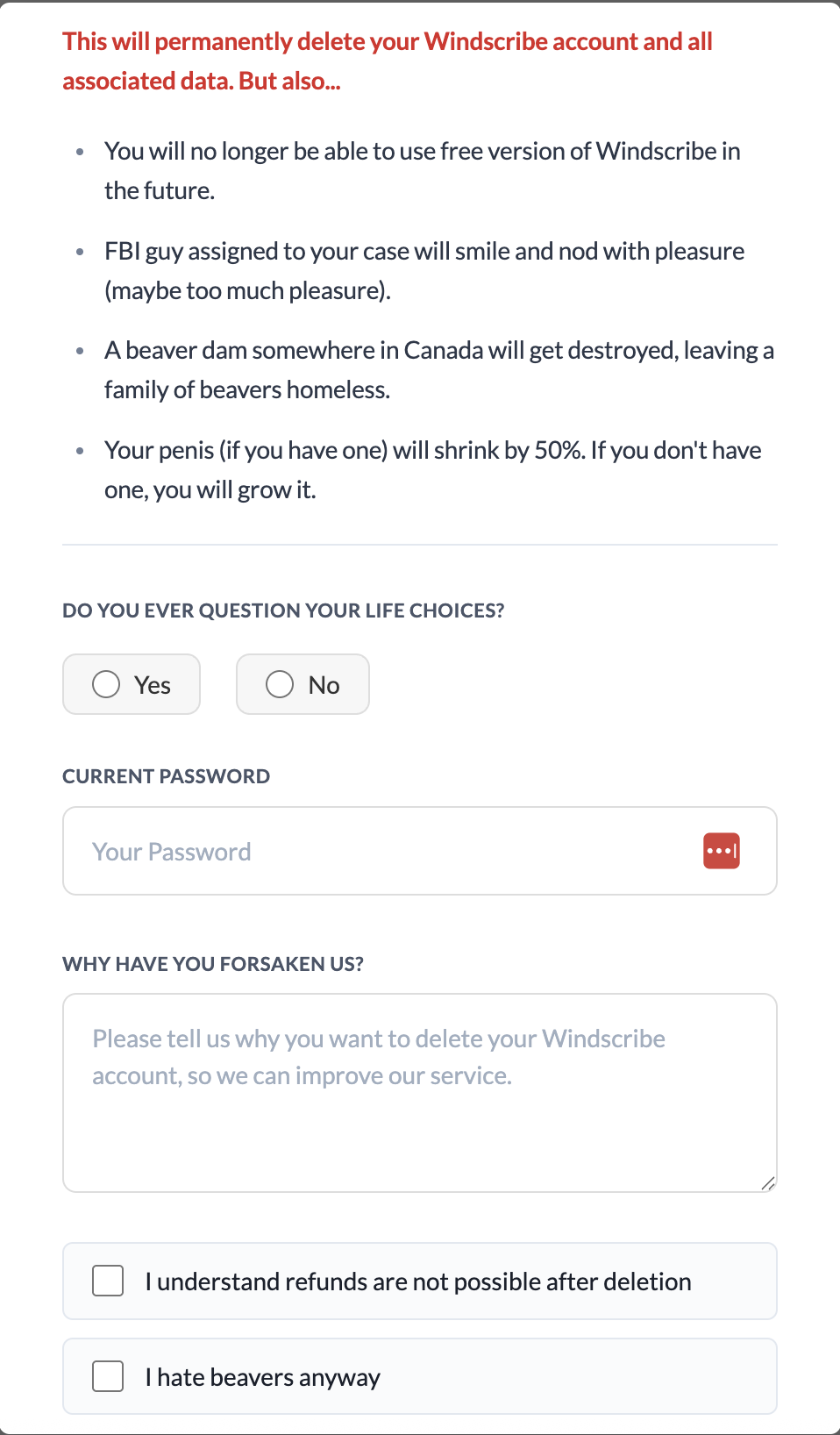
You'll have to fight through several attempts at comedy to finish deleting your account. Click Yes or No when asked if you ever question your life choices. Enter your password, write whatever you want as a cancellation reason and check both of the boxes below the text field. The Delete Account button should finally be clickable; do it. Once you've pulled the trigger, you won't be able to use the same email address to sign up for another account.
How to get a refund from Windscribe
As I warned above, you can only get a refund from Windscribe for seven days after paying for a subscription. You also cannot get your money back if you've used more than 10GB of data since the start of the payment period. Finally, you can only get refunded on the first payment of each subscription — renewals are not eligible.
If you're within those limits, you can request your money back by starting a conversation with the Garry chatbot. Click the chatbot icon at the bottom-right of the Windscribe website to start a chat. Be warned that you might have to stand firm through several attempts to fix your complaints before you can actually initiate the refund process.
Best Windscribe alternatives
Windscribe is a VPN with a lot of good points. That said, by the time you've waded through a swamp of dick jokes to complete the process, I wouldn't blame you for feeling validated in your decision to get rid of it.
There are plenty of good VPNs that can replace Windscribe. My favorite is Proton VPN, which also has a free plan, though without the ability to select your own server. ExpressVPN is simple and powerful, if a little overpriced, while Surfshark is the fastest VPN overall. If you liked Windscribe for its non-VPN features, NordVPN has the best range of extra perks.
This article originally appeared on Engadget at https://www.engadget.com/cybersecurity/vpn/how-to-cancel-windscribe-and-get-your-money-back-173000785.html?src=rss
Windscribe isn't a VPN for everybody, and it's not trying to be. Despite its high-achieving free plan, it didn't quite make my list of the best VPNs, largely due to alienating interface choices and swingy download speeds. Its iconoclastic approach to everything from design to pricing to its online knowledge…
