Having problems with your Asus ROG Ally? A new patch for Armoury Crate might have fixed some issues… but not all of them

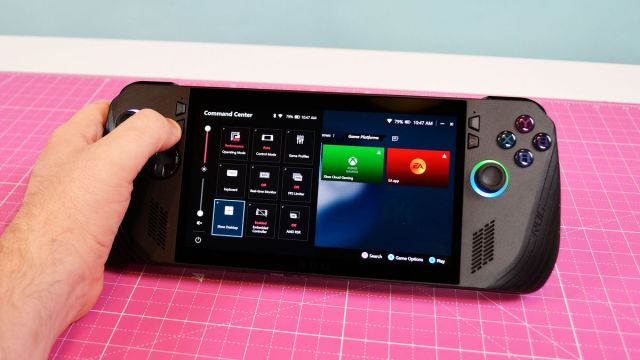
Both Asus ROG Ally X and ROG Ally users have been facing issues with the handheld’s built-in Armoury Crate software for a while now, and despite a recent patch intent on fixing multiple bugs in the software, a prominent issue points towards losing access to control inputs while in-game.
These concerns were raised by users on Reddit and Asus’s own forums, days before the Armoury Crate 1.5.20 update was pushed last week with the following bug fixes:
- Fixed issues with crashing in ACSE and the Command Centre
- Improved responsiveness when switching Control Mode in the Command Centre
- Solved an issue where Embedded Controller would not show up in the Command Centre
- Fixed an issue where the RGB lighting effects would occasionally disappear on the Lighting Page.
While it appears that some issues have been resolved, users continue to share complaints of their ROG Ally inputs resetting while having Armoury Crate installed.
This is claimed to occur more frequently when the control mode is set to ‘Gamepad Mode’ rather than ‘Auto’, in which the device will also continuously notify the user which mode is in use – a serious annoyance in itself, even setting aside the loss of control input.
Say hello to G-Helper – a great alternative to Armoury Crate
Solutions such as hard-resetting the Ally, reinstalling Armoury Crate on the device, and updating the Xbox Controller and GPU drivers have all been tested by users – but it seems as though these are more temporary fixes than permanent.
Any bugs with Armoury Crate could prove to be a significant downside for users, since Asus’s handhelds utilize the proprietary software for accessing game collections in the same vein as Steam or Playnite.
Fortunately, thanks to the help of user ‘seerge’ on GitHub, you can simply utilize G-Helper – a third-party application that gives you access to the ROG Ally or Ally X’s TDP, control mode, RGB lighting settings, and more. Unlike Armoury Crate, you won’t have to worry about a full installation, as it operates a standalone application allowing you to control settings you normally would via Asus’s own software.
As opposed to the standard Command Centre, you can set your own keybinds and also override any background Asus software services to use G-Helper whenever necessary. While there isn’t a library collection of installed games like SteamOS or Armoury Crate (meaning you’ll need to launch your games straight from the Windows 11 desktop), it gets the job done without having your gameplay disrupted with unwanted notifications or controller dropouts every few seconds.
While we wait for a fix for the issues, this might be the best temporary solution you can take advantage of. You can find any new Armoury Crate updates right here.
You might also like
Both Asus ROG Ally X and ROG Ally users have been facing issues with the handheld’s built-in Armoury Crate software for a while now, and despite a recent patch intent on fixing multiple bugs in the software, a prominent issue points towards losing access to control inputs while in-game. These…
