Have the new Apple Pencil Pro for your iPad Pro or Air? Start with these apps to try out the new skills

Apple‘s latest iPad Air and iPad Pro 2024 officially hit the market last week and got most of the attention, but there’s also a new, souped-up Apple Pencil around – the $129 Apple Pencil Pro.
Like the second-generation Apple Pencil before it, the Pro has the same look and feel as a traditional pen and is weighted with good ergonomics. Inside, though, it has a new wireless charging coil that can attach magnetically to the iPad Pro and iPad Air with the new landscape FaceTime camera.
It also boasts a new squeeze function for pulling up a ‘palette tool’, a feature I wish was there from day one in 2015. It easily lets you change the ink color or undo the strokes of a pen in what feels like the time stone from The Avengers. Apple also tossed in haptics, which provide little vibrations and nudges to confirm an action.
Of course, while these functions can be used within Apple Notes, you’ll likely want to try some more crafted experiences from developers for specific use cases.
Well, fear not – because there are already a couple of applications in the App Store that support the new accessory. If you don’t yet have one of the new tablets then check out our iPad Air 13-inch (2024) review and iPad Pro 13-inch (2024) review to see what we think of Apple’s new tablets, and either way you can keep this article bookmarked, as we’ll be updating it with new applications as we try them.
Goodnotes 6
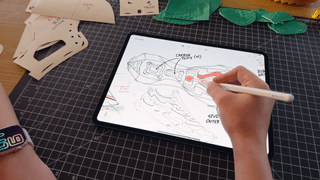
Already lauded by folks who use the iPad for planning and extensive notetaking, Goodnotes 6 has two major updates to take advantage of the Apple Pencil Pro. For starters, the Fountain Pen tool will now be more like a true writing utensil that adjusts the look of the virtual ink based on how you’re holding the Apple Pencil, thanks to the barrel roll functionality. This way, as you twist or rotate the Apple Pencil, it will reflect that movement on paper. Those who like to create calligraphy can now get more personal when writing with the Apple Pencil in Good Notes.
Similarly to the palette tool in Apple Notes, it arrives in Goodnotes 6 as a succinct way to adjust ink color and the size of a writing utensil, easily undo changes, and switch between utensils. It also has a unique user interface that matches the rest of Goodnotes. You can use it to call on tools, including snap-shapes like lassos or squares.
Morpholio Trace
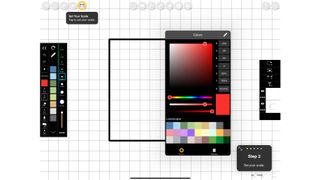
While Goodnotes 6 opts for the palette tool, Morpholio Trace’s latest update uses the new ‘squeeze’ functionality. Here, it pulls up an application-specific menu. With this implementation, you can get specific with a detailed color selection menu and view all the palettes of shades available.
Considering it’s a pro-grade sketching app for design and architecture, it makes sense that the developers are customizing the Apple Pencil Pro experience for use-cases and enhanced functionality within the app. Morpholio already offers Hover and support for Double Tap – since the former is now on iPad Air and Pro, folks sketching and designing within the app can appreciate a preview of what a stroke looks like.
You Might Also Like

Apple‘s latest iPad Air and iPad Pro 2024 officially hit the market last week and got most of the attention, but there’s also a new, souped-up Apple Pencil around – the $129 Apple Pencil Pro. Like the second-generation Apple Pencil before it, the Pro has the same look and feel…
