Google’s Circle to Search is a dead-simple way to find what you’re looking for

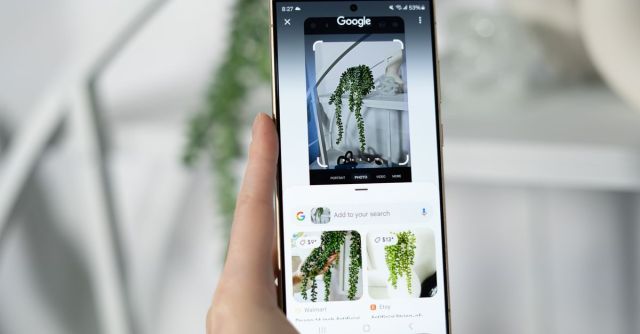
It’s hard to think of a more self-explanatory feature than Circle to Search: it does exactly what it sounds like it does. You circle something on your phone screen, tap a button, and voila! A page full of Google search results telling you about the thing you circled. Easy, right? The new feature is launching on five phones to start — the three members of Samsung’s brand-new Galaxy S24 series, as well as Google’s Pixel 8 and 8 Pro — before it comes to other “select, premium” Android phones.
Well, maybe it does need a little explaining. If the feature sounds familiar, you might be thinking of Google Lens, which is similar. But instead of opening up the Google app, you can use Circle to Search anywhere on your device. Just long-press the home button if you’re using three-button navigation — or the navigation handle if you’re using gesture nav — and it will appear on top of whatever app or screen you’re currently using. You can circle, highlight, or tap a subject, including text as well as images.
I tried it out on a Galaxy S24 in some brief demo time, and it worked well, both in isolating the subject of my search and returning useful results. Is it a radical new way to search for things on the internet? No, but it looks legitimately handy. Sometimes, the administrative overhead of taking a screenshot, closing an app, opening another app, and selecting the screenshot is just too much to bear. Circle to Search cuts out the grunt work, and it’s one of those features that just makes sense, like your phone should have been capable of it all along.
Supporting Circle to Search is an update to Google’s multisearch feature. Multisearch is an existing Lens feature that lets you modify visual searches — take a picture of a pair of white shoes, search for them with Lens, and then add the word “red” to see a different set of results with red shoes. Now, you’ll be able to add complex questions to refine your visual search. You can take a picture of a plant, add it to your search, and ask, “How often should I water this?” This is Google’s own example, but I find it highly relevant as someone who has killed more than one plant by overwatering.
The way Google explains it, multisearch is the tool you want when you’d like to know why something is, not just what something is. You could take a picture of one of those Stanley cups people are carrying around now and ask, “Why are these so popular?” Related: I’d like to know why those cups are so popular. I guess I know what I’ll be using multisearch for.
Unlike Circle to Search, the upgraded multisearch will be available in the Google app starting today for any Android device — but only in the US for now.
It’s hard to think of a more self-explanatory feature than Circle to Search: it does exactly what it sounds like it does. You circle something on your phone screen, tap a button, and voila! A page full of Google search results telling you about the thing you circled. Easy, right?…
