Google’s Art Selfie 2 uses AI to transport you to another time – here’s how to use it

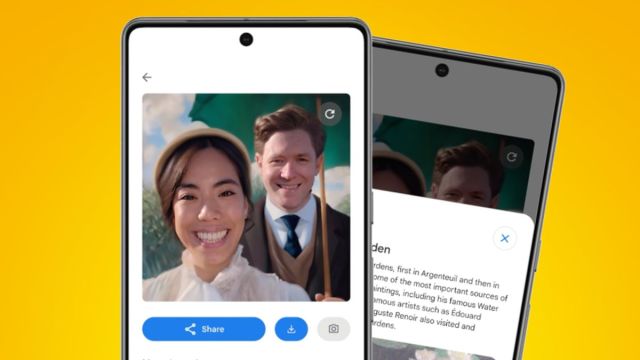
If your social media profile snaps are in need of a 2024 refresh, Google has just released a new AI-powered tool to help you rustle up some selfies with a historical twist.
Art Selfie 2, which lives in the Google Arts & Culture app for iOS and Android, is a new riff on Google’s original feature, which launched back in 2018 to help you find your look-a-likes throughout art history.
This new version instead uses generative AI (of course) to edit your selfie snap and place you in your choice of a historical or artistic moment. Its list of 27 options includes everything from Woodstock Festival to Gaucho and Rousseau’s Jungle, across art, history, and travel sub-genres.
This isn’t something we haven’t already seen from apps like Lensa, but it is completely free and very simple to use. While you’re waiting for your image to be generated (which takes around ten seconds) you can read up on the historical significance of the theme you’ve chosen, giving you an educational excuse to give it a spin.
Unfortunately, Art Selfie 2 isn’t yet available for your pets, with the Arts & Culture app only giving you the original Art Selfie option (in the Pet Portraits section) to help find your cat’s perfect match from art history. So for now, Sheba will have to look on enviously at your Italian Renaissance-style selfie.
How to take an Art Selfie
The Art Selfie 2 feature is available now in the Google Arts & Culture app, which you can download now for Android and for iOS.
Once you have the app, go to the Play section on the lower menu, choose Art Selfie 2, and then take a selfie (once you’ve enabled the app to use your camera). You can take this photo by yourself or with friends.
You can change the photo by hitting the ‘Retake’ button, but once you’re happy just scroll down to see the different AI styles. Tap on one of these to generate the image and see a description of the historical moment or painting.
Not happy with the results? You can hit the refresh button in the top-right corner to generate a new version. Once the app’s nailed it, you can share it directly to social media or download it to your camera roll.
The rest of the Arts & Culture app is well worth exploring, too – in fact, we named it as one of the 7 unsung Google apps and tools that we love last year, alongside Google Family Link, Google Scholar, Google Flights, and more.
You might also like
If your social media profile snaps are in need of a 2024 refresh, Google has just released a new AI-powered tool to help you rustle up some selfies with a historical twist. Art Selfie 2, which lives in the Google Arts & Culture app for iOS and Android, is a…
