Fake Cloudflare CAPTCHA page laden with malware uncovered in the wild – here’s how to stay secure and safe

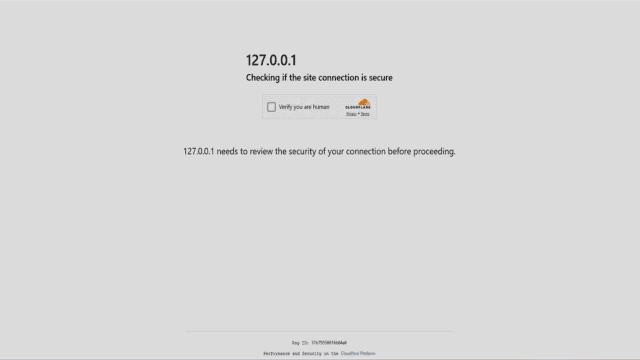
- ClickFix uses fake CAPTCHA screens to trick users into launching malware via simple keyboard commands
- The phishing page mimics Cloudflare perfectly, right down to Ray IDs and security padlocks
- Clicking “Verify you are human” starts a process that silently infects your machine with malware
A sophisticated yet deceptively simple phishing technique is currently circulating, using fake Cloudflare CAPTCHA pages to infect users with malware.
New research from SlashNext claims the technique, known as ClickFix, preys on familiar internet behavior, tricking users into executing commands that install malicious software.
ClickFix works by presenting a counterfeit version of Cloudflare’s Turnstile CAPTCHA page. Everything from the visual layout to technical elements like the Ray ID identifier is convincingly replicated.
Hinges on a prompt that users will ordinarily not scrutinize
The phishing site may be hosted on a domain that closely resembles a legitimate one, or on a real website that has been compromised.
When users land on the page, they are prompted to tick a box labelled “Verify you are human.” This step appears routine and raises no suspicion – but what follows is the core of the scam: users are guided through a set of instructions – pressing Win+R, then Ctrl+V, and finally Enter.
These steps seem harmless, but they execute a PowerShell command that has already been silently copied into the user’s clipboard.
Once executed, the command can retrieve malware such as Stealc, Lumma, or even remote access trojans like NetSupport Manager.
“ClickFix is a social engineering attack that tricks users into running malicious commands on their own devices – all under the guise of a routine security check,” said security researcher Daniel Kelley.
What makes ClickFix especially insidious is how it turns standard security expectations into weapons. The padlock icon, familiar CAPTCHA format, and a legitimate-looking URL all serve to lull users into compliance.
This exploits what researchers refer to as “verification fatigue”, a user’s tendency to click through security prompts without proper scrutiny.
The trick doesn’t rely on exploiting software vulnerabilities, but rather on abusing trust and habitual behavior.
The phishing page is delivered as a single HTML file, but contains embedded scripts and obfuscated code designed to perform clipboard injections.
Because it leverages legitimate Windows utilities and doesn’t download executables, it can evade many traditional detection tools.
Standard defenses, like antivirus software or endpoint protection, are typically geared toward catching suspicious downloads or binaries. But in this case, users are tricked into launching the threat themselves.
This highlights the need for advanced malware protection with zero-hour defense, capable of detecting clipboard injections and fake CAPTCHA screens in real time.
You might also like
ClickFix uses fake CAPTCHA screens to trick users into launching malware via simple keyboard commands The phishing page mimics Cloudflare perfectly, right down to Ray IDs and security padlocks Clicking “Verify you are human” starts a process that silently infects your machine with malware A sophisticated yet deceptively simple phishing…
