ChatGPT adds eyes to its voice with new screen and video sharing feature

- The sixth day of 12 Days of OpenAI brought visual abilities to ChatGPT Advanced Voice Mode
- You can stream video from your camera or share your screen with the AI
- Only subscribers to ChatGPT Plus and Pro have access for now
ChatGPT gazed upon day six of the 12 Days of OpenAI with a fresh eye courtesy of a new visual ability connected to its Advanced Voice Mode that lets you share your screen and live stream video to the AI chatbot. Instead of uploading photos and screenshots to ask ChatGPT questions, you can now show it what you’re looking at directly and ask for advice.
The feature is a bit like having a video chat with a friend, albeit one who isn’t sharing their own image back. But you can hear the AI’s voice, making the conversation hands-free. If you want to try it out, you can tap the voice icon in the ChatGPT app and then the video icon to start streaming video from your camera. To share your screen, just tap the three-dot menu and select “Share Screen.”
Imagine you’re struggling to assemble a new IKEA bookshelf (because who hasn’t?). Instead of staring at confusing instructions, you can point your camera at the half-built mess and ask ChatGPT, “What did I do wrong here?” The AI can check out the parts and offer step-by-step guidance.
If you need to tweak some settings on your phone or computer and aren’t sure how to do so, you can share your screen with ChatGPT to enable the AI to walk you through the menus and buttons to get things sorted. No more digging through endless tech forums or asking your friend who’s good with computers.
The feature might even make ChatGPT a better sous-chef. If your recipe says, “whisk until it thickens,” and you’re not sure if you’ve whisked enough, just point the camera at your bowl and ask ChatGPT for confirmation or a suggestion you might want to order in.
All-seeing AI eyes
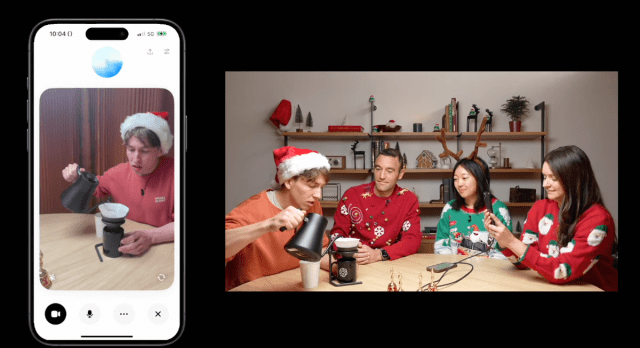
OpenAI’s CPO Kevin Weil and his team demonstrated how ChatGPT can help make pour-over coffee by pointing the camera at their brewing setup to show off the new feature during its debut. The AI understood the coffee-making gear and walked them through the steps like a virtual barista.
The feature encourages treating ChatGPT more like a person than a computer, even more than just the voice interface. Being able to ‘see’ makes the AI seem more present in the real world and less like a chatbot in a vacuum.
OpenAI did acknowledge that sharing what your camera sees might make some wary of using the feature. It’s not automatically on, you have to activate it each time you use it so there’s no accidental video shot.
The new feature is only available for ChatGPT Plus and Pro users as of right now. Enterprise and Education tier subscribers will get access next month, but OpenAI didn’t say if or when the free tier will get access.
That makes sense since it probably demands a lot of computing power, and OpenAI doesn’t want ChatGPT to go down again after what happened on Wednesday.
You might also like
The sixth day of 12 Days of OpenAI brought visual abilities to ChatGPT Advanced Voice Mode You can stream video from your camera or share your screen with the AI Only subscribers to ChatGPT Plus and Pro have access for now ChatGPT gazed upon day six of the 12 Days…
