Asus has a new version of its Surface Pro-like gaming tablet for CES, and it’s making some sizable changes both inside and out. The Asus ROG Flow Z13 for 2025 is once again a slightly chunky, almost-half-inch-thick, 13-inch tablet with a built-in kickstand, magnetic keyboard cover, a bunch of ports, and a clear window on its rear with RGB lighting to show off its innards.
Asus’ latest ROG Flow Z13 gaming tablet uses AMD’s new integrated graphics

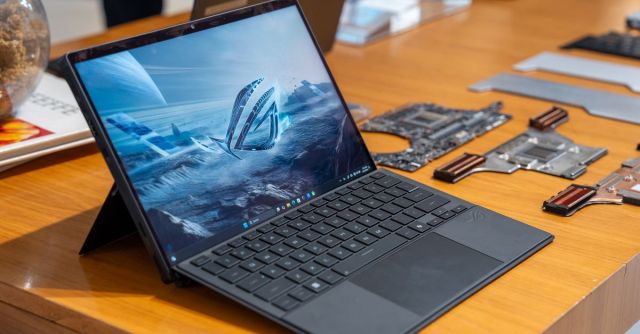
That fun glass window is now larger, with a direct view of the motherboard, but the biggest change for the ROG Flow Z13 is its switch to integrated graphics. That may seem like a step backward for a gaming-focused tablet since gamers covet dedicated GPUs, but Asus is outfitting it with AMD’s powerful new “Strix Halo” processor. The ROG Flow Z13 can be configured with the Ryzen AI Max 390 for $1,999.99 or the Ryzen AI Max Plus 395 for $2,199.99. The top-end model with the Max Plus 395 has 16 CPU cores and 40 graphics cores, while the base-model Ryzen AI Max Plus 390 (curse these names) has 12 CPU cores and 32 graphics cores. The Z13 utilizes a redesigned stainless steel vapor chamber for cooling these graphics-heavy chips, which are capable of 120W TDP.
All that power in the Z13 is responsible for driving a 13-inch, 2560 x 1600 touchscreen display with a speedy 180Hz refresh rate (up from 165Hz on the last-gen model), which you don’t often find in laptops and tablets of this size. For ports, it’s got two USB 4, one USB-A 3.2 Gen 2, HDMI 2.1, a microSD card slot capable of UHS-II speeds, and a 3.5mm combination headphone / mic jack. It’s also got a 5-megapixel front-facing webcam and 13-megapixel rear-facing camera — so you can flash your RGB as you awkwardly take tablet photos in public. It also has Wi-Fi 7.
The Z13 supports USB-C Power Delivery for charging, but that won’t be powerful enough to allow its full performance under load. Instead, it comes with a 200W power adapter that uses Asus’ proprietary and reversible slim power jack — like on its recent laptops.
Other quality-of-life improvements for the Z13 include a new detachable keyboard with larger keycaps and a more generously sized touchpad. And on its right side, beside the power button and volume rocker, is a new “ScreenXpert” button that summons a Command-Center-like widget that includes multiple-display window management controls, quick access to operating modes like Turbo mode or Silent mode, and other settings like muting your mic. It’s primarily there to help control things while in tablet mode since the keyboard contains shortcuts for most of these functions.
I got a quick glimpse of the new ROG Flow Z13 at a preview event, and Asus sent me a preproduction model right before CES to get a little bit of hands-on time. It’s what I’m writing this post on right now, and boy do I appreciate the updates to this keyboard cover. The 1.7mm key travel and bigger touchpad go a long way toward getting work done. While the Ryzen 395 chip has the potential to be power-hungry, the battery life on the Z13 shows some promise. Asus is only claiming 10 hours of battery life, and I did manage to get through a full eight-plus-hour workday of Chrome tabs, streaming music (though the speakers seem kind of bad at first listen), and writing across multiple virtual desktops the day before flying to CES — with pretty much no issues.
I definitely prefer a proper laptop to a tablet with a kickstand and keyboard cover, but being able to remove the keyboard deck for a little more flexibility and comfort when it’s time to fire up a game is pretty slick. I tried out a little Helldivers 2 on the Flow Z13, and it performed quite well, especially for a tablet. Set to the Z13’s native 2.5K resolution, in-game render scale on Ultra Quality, and texture details on medium, I saw 60fps or just slightly under, and it looked really nice. If I bumped it down from Ultra Quality to Quality scaling, it jumped up to an even smoother 80fps. This was, of course, while the tablet was plugged in and its fans were blasting on Turbo mode. Diving in again while unplugged dropped the Ultra Quality render scale performance down to the 45 to 50fps range since playing on battery limits you to Performance mode instead of Turbo.
This is preproduction hardware, but so far, it’s pretty impressive for integrated graphics. AMD’s new chip might have something special here for thin and light devices, but since it lacks Thunderbolt 5, that means the Flow Z13 can’t use the full GPU bandwidth of Asus’ new XG Mobile eGPU. (Previous models could use the older XG Mobile via its proprietary connector.) But of course, that would make this somewhat portable PC gaming solution a little less portable, and the new XG Mobile costs about as much as the Flow Z13 itself.
But does a gaming tablet make much sense in 2025 when portable PC gaming is being so adequately served by the Steam Deck and a bunch of other dedicated handhelds? We’ll have to see how a production model of the ROG Flow Z13 fares when it launches sometime in February.
Photography by Antonio G. Di Benedetto / The Verge
Asus has a new version of its Surface Pro-like gaming tablet for CES, and it’s making some sizable changes both inside and out. The Asus ROG Flow Z13 for 2025 is once again a slightly chunky, almost-half-inch-thick, 13-inch tablet with a built-in kickstand, magnetic keyboard cover, a bunch of ports,…
