Apple Music now has collaborative playlists, but it’s still stuck behind Spotify

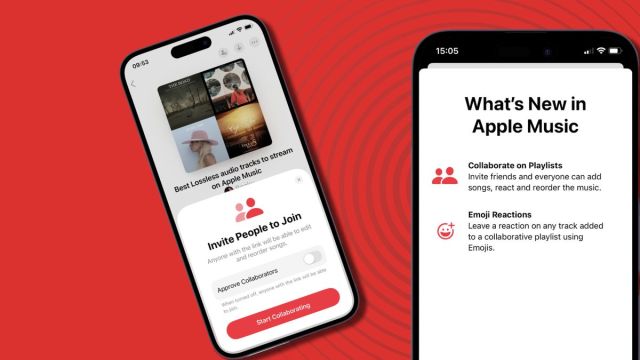
On Monday January 22, Apple released iOS 17.3 and, along with notable software updates such as Stolen Device Protection, the update adds two big features to Apple Music: collaborative playlists for Apple Music subscribers and SharePlay with CarPlay.
The former lets you team up with other paid-up Apple Music users to create shared playlists where anyone can contribute songs or simply react to your friends’ choices with emojis. The latter automatically issues anyone who jumps in your car and connects to CarPlay or Bluetooth an invitation to join in the road-trip music curation from their device – even if they don’t subscribe to Apple Music.
Want to know how to set up collaborations? Apple has helpfully shared a new video about how to use the two features, presented by its very own Rap Life Review hosts. The clip features Ebro Darden, Nadeska Alexis and Lowkey, who explain how to invite friends to collaborate on Apple Music playlists using the latest version of iOS. You can watch it below.
[embedded content]
So let’s do it! Have at my Apple Music Lossless playlist – as long as you’ve got an Apple Music subscription and have updated to iOS 17.3, you should be able to react to my Lossless (in some cases Hi-Res Lossless) choices and add away.
You can choose to monitor who can access and add to your playlist, using the ‘Approve collaborators’ toggle. But you’ll see I haven’t. Enlighten me!
Opinion: I love Apple Music, but it’s late to the party – and Spotify users are used to more
Does it sort of feel like you’ve heard this before? You probably have: collaborative playlists in Apple Music were actually first added in the iOS 17.2 beta, but the feature was removed before the final release.
It’s also worth noting that Spotify has been offering collaborative playlists since late 2020. But you’ve been able to create group playlists in Facebook messenger since 2017 – and let’s not forget, since September 2023, Spotify’s also been offering Jam Playlists, a neat feature within its collaboration tech that basically marries what you can already do using the big green streaming giant’s collaborative playlists with Blend (which merges the tastes of several people into one playlist), but it works in real time, has controls for managing the queue, and is only available to people on the same Wi-Fi network. Think of it as everyone at the party having the chance to fill the dance floor, in real time.
Deezer, meanwhile, launched a feature called Shaker last November. Yes, it’s also essentially collaborative playlists, but this particular feature is two years in the making and it allows you to create them using tracks from Spotify and Apple Music too…
I’ve said it before and I’ll say it again: I love Apple Music. It is one of the best music streaming services around for music quality. I’m a paid subscriber and I’m grateful every day that Apple offers truly hi-res, better-than-CD-quality streaming for the same price as Spotify’s low-res streams.
The thing is, I’m still not sure who among my friends actually pays for Apple Music –but we all know how ubiquitous Spotify is; Spotify Wrapped 2023 was all the evidence any of us needed.
Again, I’m grateful for the update, because truly Apple Music is one of the best music streaming platforms for audio quality, alongside Qobuz and Tidal‘s hi-res output. But Apple’s offering is still playing catch-up on Spotify when it comes to the social, collaborative aspect of music streaming.
You might also like

On Monday January 22, Apple released iOS 17.3 and, along with notable software updates such as Stolen Device Protection, the update adds two big features to Apple Music: collaborative playlists for Apple Music subscribers and SharePlay with CarPlay. The former lets you team up with other paid-up Apple Music users…
