AI will clean up your next video’s messy look and sound

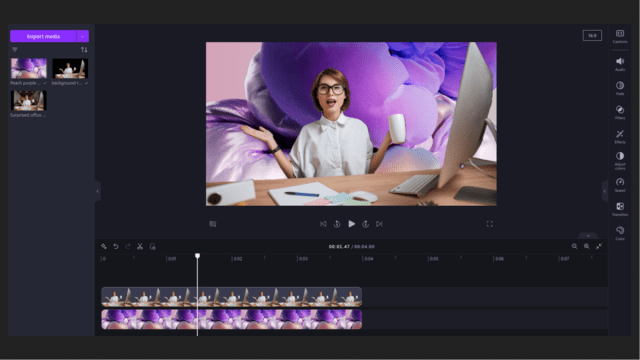
Microsoft is giving its Clipchamp video editor an AI upgrade with two new features. Clipchamp users can now employ AI to silence unwanted sounds and remove and cleanly replace background images. The new tools are accessible to Microsoft 365 Insiders but could expand to others as the tech giant seeks to incorporate AI across its media platforms.
These aren’t insignificant features to the average video editor. Unwanted noise is endemic to video production and is often cited as a headache for editors, even though it’s necessary to make sure a video sounds good. Using AI, the noise suppression feature in Clipchamp can filter out background noise while preserving important foreground audio. The AI can distinguish speech or music relevant to the video and cut out any other sound. Users can just flip the feature on through the audio settings of Clipchamp, and the AI will work to remove the problematic audio in real time. So, even if you don’t have access to professional recording studios or equipment, your video can sound like it does.
AI’s Video Vision
The other new Clipchamp feature is the image background removal tool. Thanks to the AI tool, users can deal with cluttered or distracting backgrounds that might pull focus from the video’s point. The AI is designed to seamlessly lift and remove a background without confusing the overall look of the scene. Clipchamp users can right-click on any image within their video timeline and then click on “Remove background.” Once it’s gone, you can make the background whatever you want, layering a new image or even another video behind the subject.
Embedding AI directly into software like Clipchamp helps Microsoft make AI more available to users of many of its products. That includes video creators who might be hobbyists without much technical training in editing tools. And as AI continues to expand its presence in video-making, this will likely become more common. For instance, Adobe and its Firefly AI for video can already do all kinds of video editing tricks, even make up new footage if appropriate. There are also programs like Veed that can pick your best takes for you. The same goes for more public-facing platforms like YouTube and its expected AI music generator and new brainstorming tool.
Microsoft isn’t stopping its AI video plans here. It is already working on more advanced features, including AI assistants for ongoing collaboration, automatic scene detection, and video summarization to accompany the edit.
You might also like
Microsoft is giving its Clipchamp video editor an AI upgrade with two new features. Clipchamp users can now employ AI to silence unwanted sounds and remove and cleanly replace background images. The new tools are accessible to Microsoft 365 Insiders but could expand to others as the tech giant seeks…
