I’m still waiting on the MSI Claw 8 AI+ – and in the meantime, handheld gaming with the Xreal One AR glasses should hold me over

If you’ve kept up to date with my articles recently, then you’ll be aware that I’ve been on the lookout for acquiring the MSI Claw 8 AI+ or an equivalent handheld with an 8-inch screen.
This is simply because I want a handheld gaming PC that has a bigger screen, without going overboard like some of the unappealing devices that look like a tablet and controller super-glued together.
Unfortunately, that’s not possible, since the Claw 8 AI+ is almost non-existent across retailers in the UK and the US, and opting for the Lenovo Legion Go S or the original (both using the AMD Ryzen Z1 Extreme) would seem a little nonsensical since I’d miss out on the processor upgrade. So, I guess you can say I’ve been a little out of luck… or have I?
I say this because acquiring the Xreal One AR glasses for testing on the Asus ROG Ally has left me amazed at just how much better handheld gaming can be. With a micro OLED display, an X1 chip, adjustable screen size, and distance, including an ultrawide mode (up to a 32:9 aspect ratio), it’s one of the best solutions for those who want a bigger screen. However, that’s not all.
Neck and hand strain is no longer an issue…
The Xreal One AR glasses massively contribute to a reduction of neck and hand strain. As much as I love handheld gaming PCs, I’ll admit it’s difficult to get the same experience as you would with a desktop gaming setup – and no, I’m not talking about performance.
One way or another, most will find issues with neck and hand aches (especially with heavier 8-inch devices) after prolonged periods of gaming – trust me, I can already see the “touch grass comments” – but the Xreal One glasses completely alleviate these problems.
With its follow and anchor modes, you can easily move the projected display and lock it wherever you prefer. Essentially, I could use my handheld while lying in bed and have the action projected onto the ceiling, adjusting the screen size up to 147 inches with an adjustable distance for visual clarity.
With a transparency mode, I could easily darken the surroundings of the projected display, producing a theater-like experience, built for immersion. This is best used in a dark room without any light intrusion. It’s not going to reproduce what you’d get with a full VR headset, of course not, but it does a great job at placing you in the world of your content.
It’s not just gaming either. The ultrawide mode is fantastic for 21:9 movies and games, but don’t expect much with the latter on handhelds. On Bazzite (a SteamOS clone), I couldn’t manage to get an ultrawide resolution working in Stellar Blade (the game I tested most) – so while you can use the ultrawide mode with the ROG Ally, you’ll be left with black bars in-game.
In all honesty, you should never expect to be playing at an ultrawide resolution using a handheld gaming PC. That’s the realm of a more powerful gaming PC instead – and this introduces the gripes I do have with the Xreal One AR glasses.
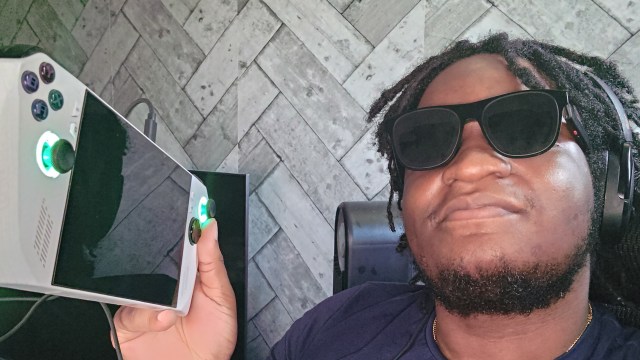
The Xreal One glasses are too expensive, especially for handheld-only usage
The biggest problem I have with the Xreal One glasses is their price. It retails at $499 / £499, which, if you’re using it for a variety of devices, is still reasonable. However, if you’re buying this strictly for your handheld (which is probably why you’re even reading this) or desktop gaming PC, then it’s hard for me to recommend.
This is because you’ll most likely need to buy accessories like the Xreal Hub to simultaneously charge your handheld while also using a separate connection for display. For those that have handhelds like the Lenovo Legion Go or MSI Claw 8 AI+, you’re in luck, as they have two USB-C ports, but the Asus ROG Ally doesn’t.
It’s no secret that the ROG Ally’s battery life is pretty bad. So, without a dock that has Power Delivery with DisplayPort or the Xreal Hub, I couldn’t use the Xreal One glasses to their full potential, as I had to keep charging my handheld after 30 to 45 minutes from full charge.
The same applied to my gaming PC, as you’ll need an HDMI to USB-C or DP to USB-C cable (with USB-A power) to get the glasses working. What I’m trying to say is I don’t like the fact that you have to spend more on accessories, as such to get the AR glasses working at their full potential, especially when it already costs a lot of money.
When you throw in the price of the handhelds themselves, it becomes a huge expense altogether, and overall, a tough recommendation. Don’t get me wrong, these are a great set of AR glasses that I’d love to use for travel and the convenience of better multitasking, but just be ready to cough up a lot of cash for the best possible experience.
You may also like…
If you’ve kept up to date with my articles recently, then you’ll be aware that I’ve been on the lookout for acquiring the MSI Claw 8 AI+ or an equivalent handheld with an 8-inch screen. This is simply because I want a handheld gaming PC that has a bigger screen,…
