You can now create ChatGPT AI images using WhatsApp and it’s ridiculously easy to do – here’s how

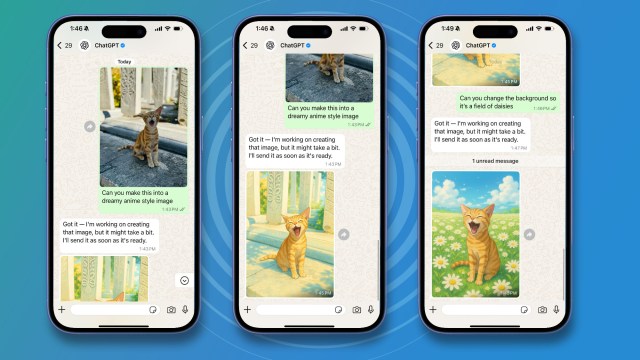
- You can now create ChatGPT images in WhatsApp
- Ask it to create any image you want
- Upload an image and ask it to modify it
You can now create and modify images using ChatGPT’s AI chops inside WhatsApp without having to use the ChatGPT app at all.
WhatsApp, the MetaAI-owned messaging app, caused more than a little controversy recently when it added a new Meta AI button to its interface that was impossible to remove.
The new button caused outrage from WhatsApp users, many of whom felt like they were being forced to use AI.
“Why do they have to slap that stuff on everything?” said Reddit user Special-Oil-7447. “I’m in the EU and it’s just been dumped on me. I am going to uninstall WhatsApp today after I have loaded Signal. Vote with your feet people”, said user BrainCell 7.
But Meta has not backed down, and the unpopular MetaAI button remains.
Tapping it will initiate a conversation with the MetaAI chatbot, however, it’s not the only AI chatbot you can use with WhatsApp.
Accessing ChatGPT
If you’re a fan of AI, then there’s nothing stopping you from chatting using ChatGPT in WhatsApp so long as you know how, and what’s more, you can now use ChatGPT to generate AI images right inside WhatsApp. You can even upload a picture and get the AI to edit it, all from within WhatsApp.
It’s easy. All you need to do is set up ChatGPT as one of your contacts in WhatsApp – as if it’s a person.
Just add ChatGPT as a contact with the number 1-800-CHATGPT (that’s 1-800-242-8478). If you’re outside of the US, then you’ll need to add them as a US contact, which I’ve written about before.
Now you can chat with ChatGPT as if it were one of your friends. When you start a chat with ChatGPT, you can simply say “Create an image of…” and add some details. Sit back and let ChatGPT do its AI magic.
To upload an image that you want ChatGPT to edit, tap the + button, then Photos, and upload the image.
ChatGPT will ask you what you would like to do with the image, and you can just use natural language to describe what you want to do.
If you reach your limit for a free ChatGPT account, but you’ve got a Plus account, then WhatsApp will throw up a link so you can link to your Plus account and get more images. It couldn’t be simpler.
You might also like
You can now create ChatGPT images in WhatsApp Ask it to create any image you want Upload an image and ask it to modify it You can now create and modify images using ChatGPT’s AI chops inside WhatsApp without having to use the ChatGPT app at all. WhatsApp, the MetaAI-owned…
