How to turn off Google’s AI Overviews in web searches
Google’s AI Overviews do not save me time. For one, I work for a tech blog and am therefore professionally curious as to whether or not the generated answers are correct, so I spend a few ticks figuring that out. (Answer: Sometimes, but not always!)
Then things get existential as I contemplate how long a self-cannibalizing system can sustain itself — if the AI gives answers pulled from websites that survive on visits from readers, what happens when no one visits those sites because AI cribbed the answer? Will I still get to write for websites if websites die from traffic starvation? It’s a lot to think about when all I want is TSA’s latest lithium-ion battery regulations.
Curiously (and unhelpfully) the first result when you Google “How to turn off AI Overviews in Chrome” doesn’t actually answer the question. The entry, from Google Support, discusses turning the feature off back when AI Overviews were experimental and handled through Google Labs. Navigate a little further down that page and you’ll see:
Note: Turning off “AI Overviews and more” in Search Labs will not disable all AI Overviews in Search. AI Overviews are part of Google Search like other features, such as knowledge panels, and can’t be turned off.
Thankfully, I work with intelligent people and one of them supplied me with a simple method of ensuring each search performed in a Chrome browser bypasses the AI Overview and uses results from the Web tab only. Here’s how you too can avoid wasted time (and energy) so you can search like it's 2024.
How to turn off AI Overviews in Chrome on desktop
Click the three dots in the upper right corner of your Chrome browser
Go to Settings > Search engine > Manage search engines and search
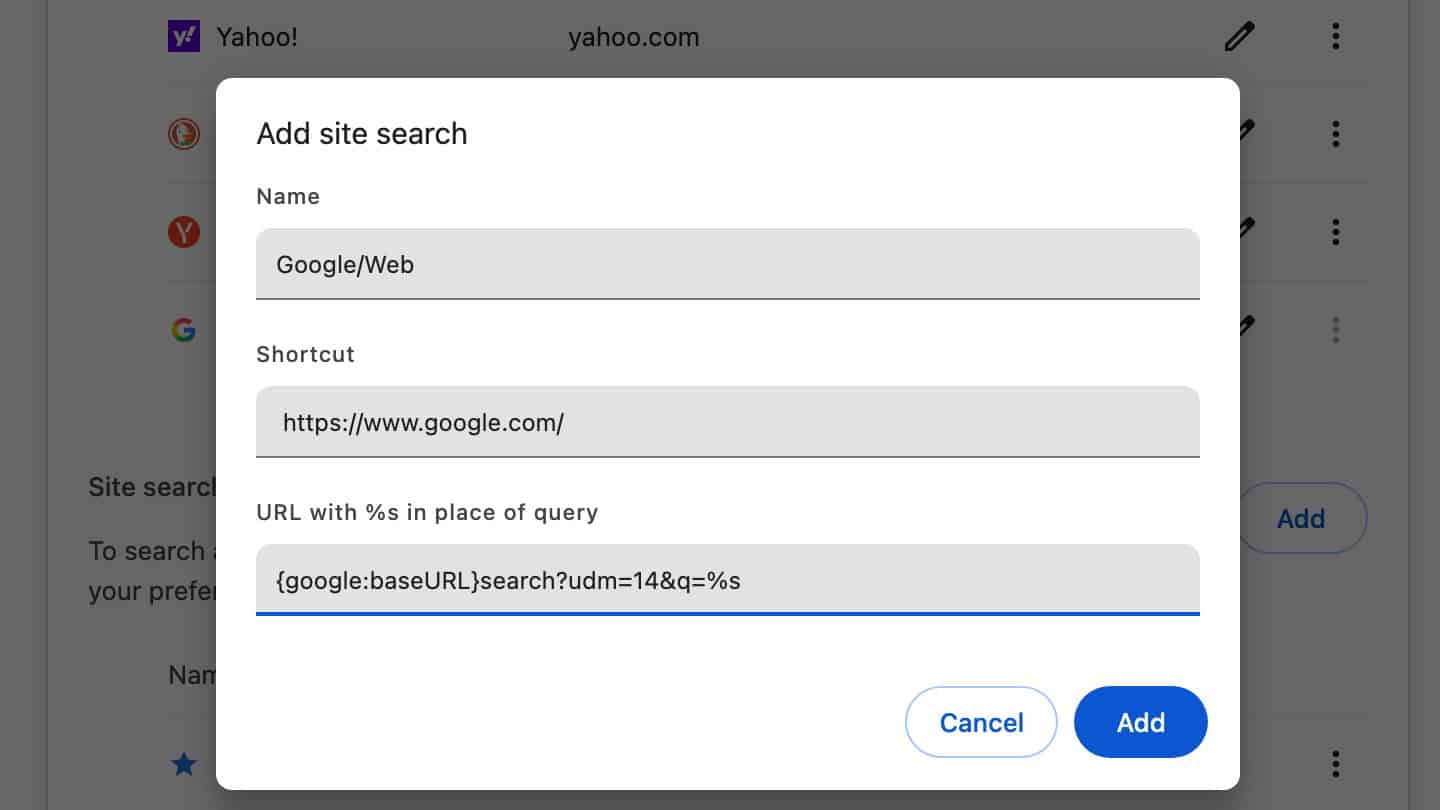
Under Site search, click the Add button
Enter Name: Google/Web
Enter Shortcut: https://www.google.com/
Enter URL: {google:baseURL}search?udm=14&q=%s
Click Add
Then, (hat tip to Tom’s Hardware for helping me figure this bit out) set the search type to default by clicking the three dots next to the shortcut you just created and clicking Make default.
Now, go Google “the best laptop power banks” and click on the Engadget entry (usually one to four results down) and spend a few moments looking at the ads (and the picture of my desk) before you move on so I can still have a job in 2026.
Other methods for turning off AI Overviews in Google Chrome
In that same Tom’s Hardware article, Avram Piltch links to the extension he built, which is a super easy way to hide the AI Overviews from sight. It’ll still generate the response, you just won’t see it. I prefer the Web method above, to avoid any unnecessary machine processing on my behalf, but the extension is easier and keeps you on the familiar “All” search results tab with knowledge panels, video results and the like.
To turn off the AI Overview for Chrome on your phone, I’ll direct you to the fine folks at tenbluelinks. Just open the link in your phone’s browser and follow the steps for Android or iOS.
This article originally appeared on Engadget at https://www.engadget.com/big-tech/how-to-turn-off-googles-ai-overviews-in-web-searches-170009873.html?src=rss
Google’s AI Overviews do not save me time. For one, I work for a tech blog and am therefore professionally curious as to whether or not the generated answers are correct, so I spend a few ticks figuring that out. (Answer: Sometimes, but not always!) Then things get existential as…
