How a designer turned an iPad and Apple Pencil into the heart of a creative business

Part of what makes Apple’s iPad experience so compelling is the sheer versatility of the tablet. Back when I reviewed the new iPad Air with M3, I called out the multiple ways of using it: touch, Apple Pencil, or via a Magic Keyboard. It’s a pretty winning formula.
Here in the States, it was Small Business Week last week, and I had the chance to chat with Mandy Corcoran, a surface designer whose work has been used on products sold at Home Goods, TJMaxx, and Nordstrom Rack, to name a few.
Now, I love a good design in its own right, but the tech angle here lies deep as Corcoran – who goes by Amanda Grace Design – uses an iPad Pro, Apple Pencil, and Procreate to do it all.
It all started in 2018 on Christmas morning, when her husband gave her an iPad Pro and Apple Pencil, and as Corcoran says, “it changed everything.”
“I downloaded Procreate that day, and something just clicked,” she explained, noting that the Apple Pencil felt natural. After sketching digitally within Procreate, she had a realization that this would be a larger part of her life.
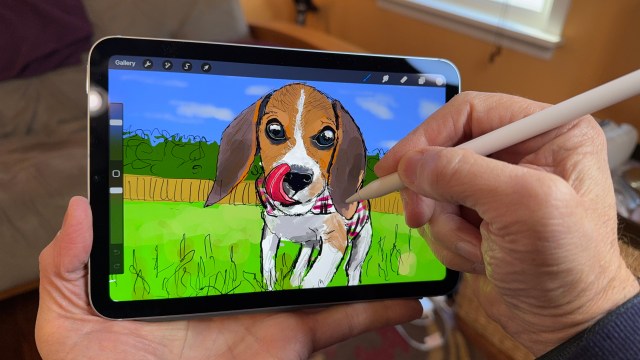
Before jumping into design work, Corcoran was rooted in tech; she was a programmer, which she described as very logic-based – “it’s structure, flow, and problem-solving, which always appealed to my brain. When I found seamless pattern design in Procreate, it felt like a creative extension of that mindset.” And she got her start with drawing – pre iPad – using a Wacom Cintiq and Adobe Photoshop.
When she designs patterns with Procreate, Corcoran says it lets her use her “tech-brain” creatively. She explains that there is a mathematical precision to the creative and design process, as she needs to fit various designs together, figure out the right flow, and ultimately end up with something meaningful.
“For me, it’s all about giving people tools to unlock their creativity faster,” explains Corcoran on creating templates and patterns. She noted that when she first started, there weren’t many templates or charts to help with layout and eyeflow.
So, when she first began designing, she went on a deep dive within the app and ecosystem, learning every part of it. This helped her create her first course and become one of the first educators offering customizable pattern templates in 2023.
And her focus, or special sauce, is really all around surface design – creating the tools herself, but also offering courses to let others create with these tools and design their own.
It’s sort of an iPad ecosystem for design, and a well-brewing one at that. She explains it as, “I run a design business, create online courses, build templates, test brushes,” all on the iPad, and it’s one device where she can have everything live without worrying about if there’s enough power or speed.

Corcoran uses an iPad Pro, a 13-inch one with the M4 chip under the hood. In TechRadar’s testing, it performed incredibly well, letting you blaze through almost any task you’d want to on an iPad and running more intensive creative workflows without a hitch.
She has been a fan of the Apple Pencil, describing it as “an extension of your thinking.” Corcoran’s been using the Apple Pencil Pro with her iPad Pro, which offers a bit more functionality, including barrel roll support and squeeze functionality.
“As someone who loves creating systems, I really appreciate how hover, double tap, and now squeeze with Apple Pencil Pro give me shortcuts at my fingertips – without ever putting my pencil down. That’s huge,” explains Corcoran.
Using it all together within Procreate and other creative apps, it allows for more precision when creating a design, and when Corcoran is teaching, it’s an easier way to explain “how to move faster” and with more confidence.
It’s clear that iPad and Apple Pencil have been a key part of Corcoran’s career, allowing her to create her own business but also encouraging other folks to create and design on their own. “iPad and Apple Pencil have allowed me to build a creative career on my own terms – and that’s not something I take for granted.”
Further, she says that you don’t need to be an expert to get started with being creative on iPad, encouraging folks and TechRadar readers to “just open an app like Procreate, tap around, and start playing.”
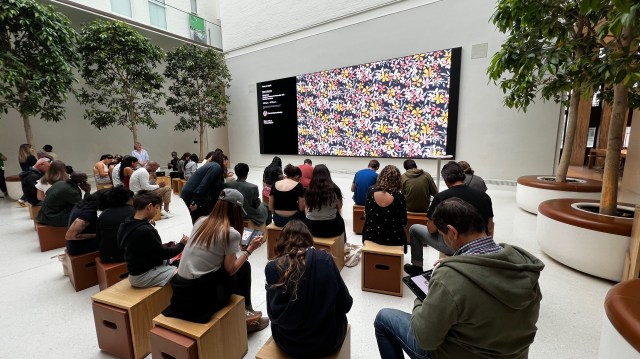
A few weeks back, on April 26, 2025, at the Apple Carnegie store in Washington, DC, Corcoran hosted a Today at Apple Session for 30 participants on creating within Procreate using patterns around a fruit theme. She described it as a full-circle moment, ultimately allowing her to teach what has been a life-changing process for her.
After creating countless patterns and designs – some now featured on products in major retailers – she left the crowd feeling inspired and confident.
“A few people told me afterward they’d never even realized how many things in their lives had patterns – and that this opened their eyes in a completely new way,” noted Corcoran.

You might also like
Part of what makes Apple’s iPad experience so compelling is the sheer versatility of the tablet. Back when I reviewed the new iPad Air with M3, I called out the multiple ways of using it: touch, Apple Pencil, or via a Magic Keyboard. It’s a pretty winning formula. Here in…
