Copilot+ PCs with Snapdragon CPUs can now install popular tool that lets you customize Windows 11 and improve the Start menu in ways that Microsoft won’t entertain

- The latest version of Windhawk, a popular customization tool, supports Arm
- That means those with Snapdragon PCs can use it to put their own stamp on Windows 11
- There are some catches here, though, including that not every Windhawk mod will work on Arm PCs right out of the gate
Those with a Copilot+ PC that has a Snapdragon (Arm) processor now have more customization options for Windows 11 at their fingertips, because a popular third-party app now has a version that works on these devices.
Yes, anyone with an Arm-based PC who’s been enviously eyeing Windhawk, and the powers this tool boasts in terms of changing the Windows 11 desktop, can now enjoy the app – whereas previously only those with AMD and Intel CPUs could.
Windows Central picked up on the launch of a new version of Windhawk (v1.6) which is optimized for Snapdragon chips.
The release notes for Windhawk v1.6 inform us that: “Windhawk can now be installed on Arm64 versions of Windows, and customization of native Arm64 programs is fully supported. Customization of x86 and x64 programs on Arm64 Windows has some limitations, which might be improved in the future. Some mods may need to be adjusted by their authors to work correctly on Arm64 Windows.”
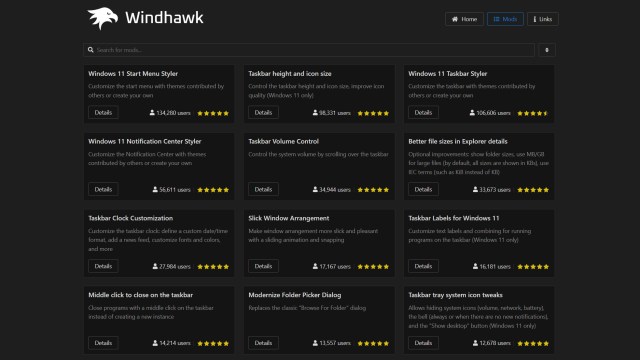
Windhawk is a base platform that allows you to browse an array of mods and apply any of them to Windows 11, letting you pick and choose the customizations that you want.
So, you can change the taskbar for example, or go to town on overhauling the Start menu, or apply an entire theme. A recent example of the latter is a Windows Vista-inspired theme for Windhawk, giving Windows 11 a retro vibe while still keeping its modern lines.
Analysis: A powerful utility with a couple of caveats
It can’t be a bad thing that a popular piece of software which is truly bristling with options to make Windows 11 look different is now available more widely. After all, it isn’t just folks with AMD or Intel-powered PCs who might want to tweak and polish Windows 11 (or maybe even change it entirely).
That said, there are a couple of slight catches here. Firstly, as the release notes indicate, some mods might need tinkering with to work on an Arm-based PC with Windhawk 1.6 – and the authors may, or may not, get around to doing that. Your choices may still be more limited with a Snapdragon PC given that, especially in these early days for the Arm-friendly take on the utility.
Furthermore, I have to issue the usual warning here which is that Windhawk is a piece of third-party software, and you must always be cautious when installing such apps on your PC.
In this case, Windhawk has been around for some time and has a reputation as a secure enough prospect as far as third-party efforts go. But still, it must be said that you install anything on your system at your own risk – even if it’s an apparently low level of risk.
Aside from potential security concerns, there are also times when third-party apps that customize the Windows 11 interface considerably can throw spanners in the works when it comes to Microsoft’s monthly patches (or yearly upgrades for that matter).
Windhawk is particularly prized for its ability to refine the Start menu, and accomplish tricks like removing the Recommended panel from that part of the Windows 11 interface, a piece of the jigsaw that many feel gets in the way. (Although that ability may be provided by Microsoft, finally, based on clues hidden away in test builds of Windows 11 – but for now, you’ll need a workaround to do this, such as Windhawk).
You might also like…

The latest version of Windhawk, a popular customization tool, supports Arm That means those with Snapdragon PCs can use it to put their own stamp on Windows 11 There are some catches here, though, including that not every Windhawk mod will work on Arm PCs right out of the gate…
