The Flipper Zero creators have a new tool to fight work distractions

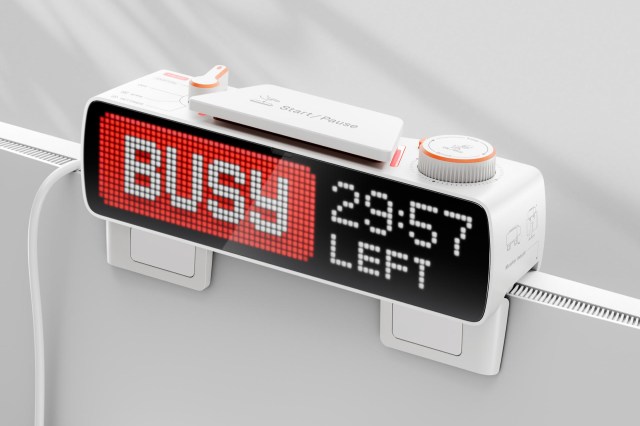
The creators of the Flipper Zero, a sort of electronic Swiss army knife for communicating with other devices, have come up with another tool that’s designed to boost productivity and reduce distractions. The Busy Bar is a customizable app-connected pixelated display that lets others know when you need to be left alone to focus, but it can also be used to help with self-motivation and sticking to a schedule or routine.
At its most basic functionality, the Busy Bar is an oversized timer with an eight-hour battery and a prominent 72 x 16 LED pixelated screen on the front that can display preset or custom status messages next to a countdown timer. Pressing a large button on the top of the device activates your status such as “busy” or “on call,” while a scroll wheel lets you dial in a specific amount of time so others know how long it will be until you’re available again.
The Busy Bar can be left sitting on your desk, mounted to a wall, or propped up on top of your screen using a folding support stand on the underside. When it’s facing away from you, a smaller secondary monochromatic screen on the back lets you see what status you have displayed on the front, as well as status icons for battery life and connectivity.
You can get similar functionality from a piece of paper, tape, and a Sharpie marker, but the Busy Bar, which is launching through a Kickstarter crowdfunding campaign, justifies its $189 price tag by doing more than just scaring distractions away. When connected to a network over Wi-Fi or a PC with a USB-C cable, it can work alongside mobile and desktop apps to automate status messages.
When you hop on a Zoom call, for example, the Busy Bar will automatically display an “on call” status, or show a “do not enter” if it’s mounted outside your office and you have a meeting scheduled in your calendar. The display also supports the Matter protocol, allowing it to control compatible smart devices. In addition to displaying a “do not enter” message, the Busy Bar can automatically secure the smart lock on your office door when a meeting starts, pause music playing on a smart speaker, and adjust the lights so you look better on camera.
It integrates with third-party apps so you can set up automations, but it goes one step further on mobile devices. With the Busy app installed on your smartphone and connected to the Busy Bar, changing your availability status can also automatically block notifications on iPhones and Android devices and even limit access to distracting apps like TikTok and Instagram so you can focus.
If you’re a developer, you can use the Busy Bar’s open-source SDK to expand its functionality. You could repurpose it as a live display for everything from how your stocks are performing (if you’re brave enough these days) to how many social media followers you’ve amassed. It’s even compatible with the open-source home automation tool, Home Assistant, letting smart home devices trigger actions on the Busy Bar, like sending an alert when your laundry is done drying.
It may not be as effective as an angry look when coworkers stop by to chat while you’re racing a deadline, but the Busy Bar seems like a more capable alternative to taping a “do not disturb” sign to the back of your screen.
The creators of the Flipper Zero, a sort of electronic Swiss army knife for communicating with other devices, have come up with another tool that’s designed to boost productivity and reduce distractions. The Busy Bar is a customizable app-connected pixelated display that lets others know when you need to be…
