Gemini is coming to Google Calendar, here’s how it will work and how to try it now
Google‘s infusion of its Gemini AI across its services continues with Google Calendar. As someone who often relies on that calendar to ensure I get where I need to be on time, I was intrigued about the possibilities for Gemini in this context.
It is being pitched as a way for Gemini to check your schedule, find event details, and even create events for you through natural language prompts. Here’s the deal, though.
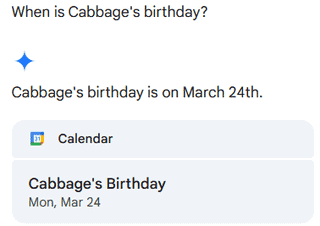
Gemini in Calendar is supposed to make life easier by letting you simply ask for what you need. No more scrolling through endless event entries or manually adding things like “Lunch with Sarah” (which, if I don’t type immediately, will be lost to the void forever). Instead, you can say, “When is my next meeting with my manager?” “Add a dentist appointment for 2 p.m. on Friday.” or “When is Cabbage’s (my dog) birthday?”
You may like

It’s not available to everyone yet. Right now, Gemini in Calendar is part of Google Workspace Labs. To try it, you have to enroll in Google Workspace Labs first. This means going to the sign-up page, checking the right boxes, and then awaiting approval, which shouldn’t take long.
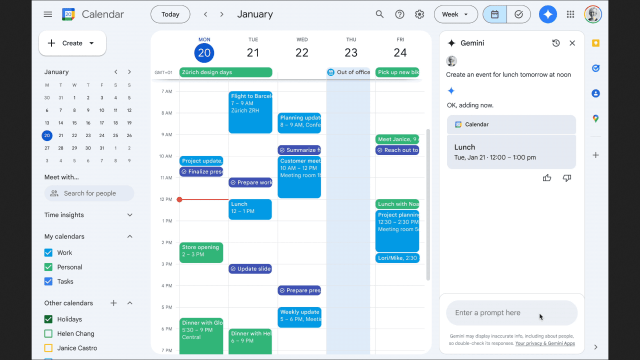
Once you’re in, Gemini appears in the Google Calendar web version as an “Ask Gemini” button in the top right corner. Clicking it opens a panel where you can see suggested prompts or type your own request.
There’s a satisfying simplicity to asking, “What’s on my schedule tomorrow?” and instantly getting an answer instead of manually clicking through the calendar grid like you’re decoding ancient scrolls.

Calendar calculations
I played around with Gemini, seeing if it could pull up people’s birthdays and upcoming meetings and whether it could make plans for me by asking it to do things like “Add a dinner reservation for Thursday at 7 p.m.” My somewhat scattershot testing all showed Gemini capable of doing everything it claimed, though that means some caveats.
If you’re hoping for full AI-powered event planning, like automatically inviting people to an event, finding the best time based on everyone’s availability, or securing a prime reservation at that trendy sushi place, you’re still on your own. Gemini can add events to your calendar, but you’ll need to manually invite guests. It also, for now, only works on the web, meaning mobile users will have to wait for their AI scheduling dreams to come true.
And, as with all things AI, there’s the question of trust. AI has a way of being almost right, which is sometimes worse than being completely wrong. For example, when autocorrect changes “meeting at three” to “me eating at three,” it is technically accurate but wildly unhelpful. So while Gemini is great for quick tasks, I haven’t completely handed over my calendar to it just yet. I still like knowing that if something’s important, I put it there rather than trusting an algorithm to keep my life in order.
For those who try it and decide it’s not for them, turning off Gemini for Calendar means leaving Google Workspace Labs entirely. There’s no halfway opt-out. But honestly, unless you already have an extremely well-organized system, it’s worth testing, in my opinion. Even if it only saves you from missing one important meeting, that could be a lifesaver.
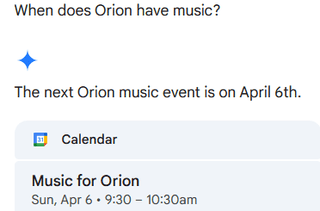
It’s also worth pointing out that the real magic of Gemini isn’t that it does anything wildly new, it just makes using Google Calendar easier. And if you need to remember your son’s next music class, that ease of use could be a real boon.
You might also like
Google‘s infusion of its Gemini AI across its services continues with Google Calendar. As someone who often relies on that calendar to ensure I get where I need to be on time, I was intrigued about the possibilities for Gemini in this context. It is being pitched as a way…
