Trello’s new update helps you manage Slack, email, and everything else

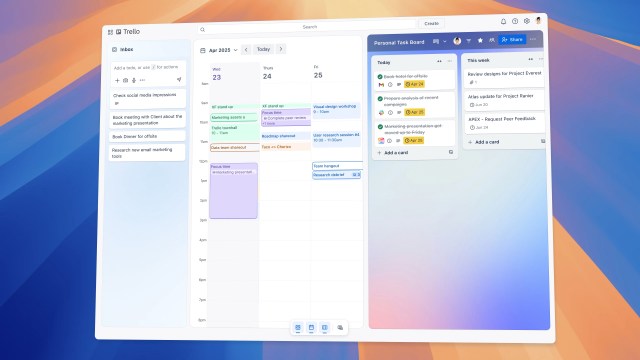
Trello is launching several new features this week, all designed to turn the Atlassian-owned app into something like a universal to-do list for everything in your life. By integrating with Slack (and soon Teams), email, and Siri, the company is hoping it can help you put all your important stuff in one place – and then use Trello’s organization tools and a little AI to help you get it all done.
Trello originally became popular because of its structure: Kanban boards are powerful and flexible enough to contain almost any kind of project and system. That part doesn’t need to change, says Guarav Kataria, Trello’s head of product. “It’s just that there are too many things in too many places. You’re in email, in Slack, all the social media places and numerous other work tools… and then when you’re running or walking, you probably get ideas in your head.” So now, there’s a new Inbox column in every board, which you can dump things into from all over the web, to be organized later.
Kataria’s insight is not new — from Slack to Dropbox to Notion to Google, everybody’s trying to solve the too-many-tools problem by adding another tool. Trello’s way of solving the problem is not to integrate with a million other apps or try and help you Do More Work inside Trello itself, though, but rather to just more easily get everything in one place. Forward an email to Trello or save a message for later in Slack, or just tell Siri what you need to get done, and it’ll add it to the inbox. It’ll also summarize the message in the card, plus add relevant due dates and sub-tasks. Making capture fast and easy was the key to the whole design, Kataria tells me.
Since this is Atlassian we’re talking about, there are also a couple of Jira-specific integrations, but for the most part Kataria thinks summarizing the thing and linking out to it is all you really need. And he says that between your email and your messaging app, you’re covered on just about any kind of task. “We are not trying to become an uber project management tool,” he says. “It’s just that we can make an individual user more productive by bringing their action items into Trello, and organizing these action items.”
In addition to the side-scrolling boards, there’s also a new calendar view in Trello, called Trello Planner, which you can use to schedule time for all those emails, Slack messages, and tasks. (Time blocking is a huge trend right in productivity nerd circles.) Tasks you add in Trello sync back to your calendar as events, too.
The new features are in beta now, and rolling out to all Trello users in April. Kataria frames the new features as the beginning of a more AI-focused Trello, but also a return to what made the app a success in the first place. “The focus is homing in on an individual user’s productivity problems, not their company’s project-organization problem,” he says. “We are trying to simplify Trello.” Like so many productivity tools, Trello has become complicated and bloated as customers have demanded new features; now it’s trying to get back to helping you manage your life. And all the apps that come with it.
Trello is launching several new features this week, all designed to turn the Atlassian-owned app into something like a universal to-do list for everything in your life. By integrating with Slack (and soon Teams), email, and Siri, the company is hoping it can help you put all your important stuff…
