I’ve been using a work laptop with a dedicated Microsoft Copilot key for months now — and it’s made me realize one thing

When Microsoft Copilot was first announced back in September 2023, I, like many other observers in the technology world, was excited to see what it could do.
Offering an AI-boosted way to get exactly the information or help you require whenever you need it, launched with just the press of a dedicated Copilot button (the first major change to the Windows keyboard layout in years) the tool potentially offered a breakthrough for my often manic and chaotic working day.
So when given the chance to review the HP Envy x360 14-fc009na, one of the company’s first Copilot-enabled business laptops, I jumped at the chance – so how much did Copilot change my working life?
Go go Copilot?
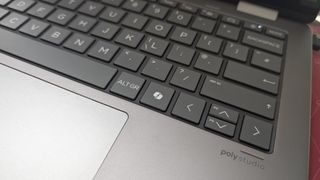
In short – not much.
In fact, to begin with, it was a slight annoyance – the new dedicated Copilot key on the keyboard layout was the victim of more than a few accidental presses as I got used to my new device.
When I remembered it was there, I would try and utilize Copilot the best I could, primarily for tracking down specific work documents, or finding information on an event we had held last year, in preparation for this year’s event.
This was fine – but there were often hiccups with finding information or documents within Google Drive (the primary system we use here across Future PLC) – and needing to sign in with a Microsoft 365 account to get more detailed answers was a bit of a roadblock.
As I began to trust it more and more though, I found Copilot was great for quickly summarizing news alerts (useful when brainstorming headlines for a news story) as well as identifying the best sources to quote when confronted with a huge array of choices, saving me time and stress when pulling together our daily news list.

Of course, this is just based on my day-to-day usage, and is in no way representative of everyone using Microsoft Copilot.
The tool was always designed for those who might be juggling huge amounts of information, such as work documents across multiple projects and deadlines, or those needing an extra bit of polish or refinement on their work emails.
Obviously I was not about to use AI to smarten up the articles I write (as this goes against several pertinent personal and corporate policies) but you can definitely see the opportunity for those who might need a little inspiration.
Microsoft has already announced its next step forward, with upgraded “Copilot+ PCs” set to launch later in 2024, but as my colleague Matt Hanson reported in his hands-on, even those advanced devices have some concerns around just how much they will offer everyday users.
So in short, the Copilot key on my HP Envy x360 14-fc009na went largely neglected – but it could definitely be a vital workspace tool for you, so I’d wholeheartedly recommend giving it a go as soon as you can.
More from TechRadar Pro

When Microsoft Copilot was first announced back in September 2023, I, like many other observers in the technology world, was excited to see what it could do. Offering an AI-boosted way to get exactly the information or help you require whenever you need it, launched with just the press of…
