Your Google Pixel might make it even easier to capture Astrophotography shots

Pixel phones have had an Astrophotography mode for several generations now, allowing users to take great pictures of the stars at night. However, accessing this mode requires you to activate the Night Sight feature first, but that may soon change in a future update.
The unofficial Google News channel on Telegram discovered it could be possible to manually activate Astrophotography mode on Pixel. According to the channel’s findings, the change will roll out with the release of the Pixel Camera app version 9.5.118.
To turn on the feature, users will need to go into the Night Sight quick settings menu and enable Astrophotography. Online reports say you can switch modes on the fly by scrolling the slider from “Auto” to “Astro” within Night Sight. It’s indicated by an icon featuring a crescent moon with a plus sign, and it should be a lot easier to enable quickly.
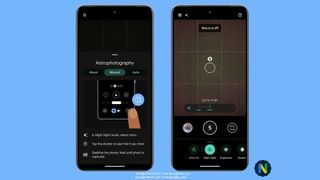
Pushing the shutter button starts a five-second timer and this brief window allows you to set your phone in a stable location before it begins taking long exposure shots of the night sky. It’ll do this for about four minutes. Processing a final image may take some time, and it reportedly depends on the age of the phone and the “exposure length.”
Android Authority states users can change the timer from five seconds to three or ten seconds. Or, if you prefer, you can just disable the whole thing. However, it doesn’t seem possible to shorten or extend the exposure time frame. 9To5Google, in their coverage, claims the four minutes are a fixed amount that cannot be adjusted.
Keep in mind that your Pixel phone still needs to be under optimal lighting conditions to take a photo of the night sky. Although Astrophotography mode will help you, it’s not magic.
Sideloading the update
Officially, the update is not available to anyone; however unofficially, it is. If you wish, you can actually sideload the Pixel Camera version 9.5.118 APK (Android Package Kit) onto your Pixel smartphone. Installing the software also nets you extra video tools and exclusive Pixel 8 Pro features such as Pro Controls for adjusting the rear camera system.
There are a couple of things you need to know. First, the Pixel Camera APK bundle is massive at 500MB. 9To5Google says you can’t just download the APK for the app because a message appears stating you’re using an “invalid version of Google Camera.” Second, you must have the APKMirror app installed on your mobile device, which is available on the Google Play Store.
Comments on the Pixel subreddit claim the bundle is safe; however, downloading any files from an unverified third-party source always puts you at risk of malware. We recommend waiting for Google to roll out the update, although that may take a while. If you understand the risk, the bundle can be located on the APKMirror website.
Be sure to check out TechRadar’s list of the best Pixel phones for 2024.
You might also like
Pixel phones have had an Astrophotography mode for several generations now, allowing users to take great pictures of the stars at night. However, accessing this mode requires you to activate the Night Sight feature first, but that may soon change in a future update. The unofficial Google News channel on…
