Slack introduces iPhone widgets to make work more inescapable

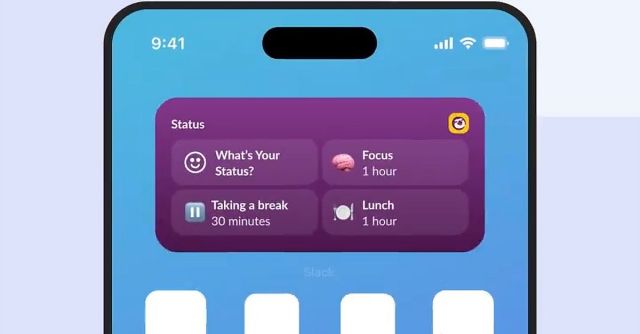
Today, Slack introduced the first four widgets for the iOS version of its mobile app. Three of them are designed for the iPhone’s homescreen, while the fourth can be added to the lockscreen, allowing users to jump immediately into the Slack app after unlocking their device.
The homescreen widgets include Catch Up, which provides an at-a-glance look at how many unread messages and mentions a user has without opening the app. It gives a little more detail than the Slack app icon’s badge, and tapping the Catch Up widget takes users directly to that section of the Slack app so they can quickly swipe through conversations they’ve missed.
The other two homescreen widgets streamline Slack status updates. Tapping the smaller Status widget also takes users directly to that section of the Slack iOS app, while a larger version offers the same functionality plus three preselected status options: one-hour “Focus” and “Lunch” statuses, plus a half-hour “Take a break” status. However, those preselected options aren’t customizable at this point.
Slack finding its way onto all of our devices has already made work feel like a nonstop thing. If you really want to bring more work into your life, adding these widgets could go even further, putting work front and center every time you open your phone.
Today, Slack introduced the first four widgets for the iOS version of its mobile app. Three of them are designed for the iPhone’s homescreen, while the fourth can be added to the lockscreen, allowing users to jump immediately into the Slack app after unlocking their device. The homescreen widgets include…
