Microsoft quietly updates controversial Windows 11 Recall feature – but not with the changes that are really needed

Microsoft’s flagship AI feature for Copilot+ PCs, Recall, has been through the wringer lately, and at the risk of sounding like a hater – rightfully so.
In case you missed it, Recall takes screenshots every few seconds, building up a library of images you can search via AI, but the feature has some serious issues on the privacy front, to the point that the launch of Recall was pulled and banished back to the Windows Insider Program for further testing.
However, that hasn’t stopped Microsoft from quietly adding new features to Recall as the tech giant runs damage control around this whole controversy.
As discovered by well-known leaker Albacore, writing for Tom’s Hardware (via Neowin), there are a few new chunky bits of functionality hidden away in the latest Windows 11 preview build (in the Canary channel).
One of those is ‘screenray’ which is a utility that’ll pop up to analyze what’s currently on the screen. It’s summoned via a keyboard shortcut and allows the user to get extra information from Copilot about anything present on-screen, or access a translation for something in a foreign language.
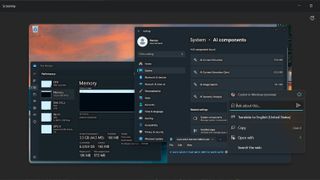
While we have a limited understanding of the exact nature of this new tool, it does seem similar to the Reader feature in Safari that Apple introduced during WWDC – which leverages Apple Intelligence to scan a web page and translate, summarize, or add insight to whatever content is currently being browsed. Of course, Windows 11’s Recall tool is available across your entire system, not just in a browser.
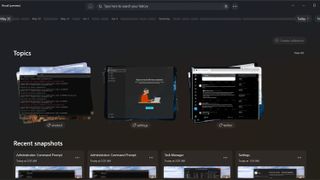
Alongside this, Microsoft has implemented a revamped homepage design for Windows 11’s Recall feature. This means that when you fire up Recall, instead of being presented with a new snapshot, you get a grid of recent snapshots (there’s still a button to allow you to create a new snapshot – this just doesn’t happen by default anymore).
Also new is a ‘Topic’ section that organizes snapshots by themes, so you can group together related screenshots (for, say, Spotify) to make for easier searching.
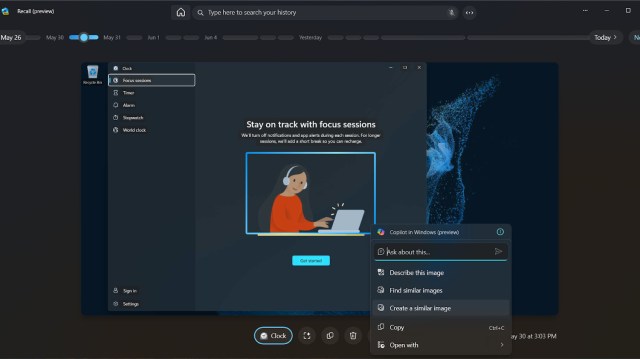
Finally, Windows Recall also has better integration with Copilot in this new preview build. Clicking on a snapshot will produce a drop-down menu with context-sensitive choices, so you can get Copilot to copy something, open it in an app, or if it’s an image, find pictures in the same vein, or create a similar image. All the standard Copilot options, essentially.
While these new additions to the controversial feature seem useful, I’m finding it hard to get past how bizarre the whole feature feels in the first place. I’m sure I won’t be the only one, either, and with all the concerns raised about Recall in recent times, Microsoft has a lot of work to do. It’ll definitely take a lot more to get me on board than a homepage redesign and this new screenray functionality.
For now, Windows Recall lives in the Windows Insider Program, where it’ll be tinkered with and tested for quite some time, most likely, before Microsoft dares try to launch it again. Whatever happens, when the feature hits release, Microsoft needs to make sure it gets things right this time around, and that means working on privacy and security as an absolute priority.
You might also like…
Microsoft’s flagship AI feature for Copilot+ PCs, Recall, has been through the wringer lately, and at the risk of sounding like a hater – rightfully so. In case you missed it, Recall takes screenshots every few seconds, building up a library of images you can search via AI, but the…
