5 of the best iOS 18 features that’ll work with your older iPhone – and 5 that won’t

iOS 18 will become available to download on any iPhone newer than the iPhone XS later this year (likely September), which is great news for anyone who hasn’t yet upgraded to one of the best iPhones.
In other words, if you’re still valiantly sporting an iPhone XS, iPhone XR, iPhone SE (2020) or iPhone 11, you can rest assured that you won’t miss out on any of the best iOS 18 features. That said, due to the aging chipsets inside these older iPhone models, there are a handful of lower-key iOS 18 features that won’t be made available across the board.
Below, then, we’ve rounded up five of the best iOS 18 features that will work with your older iPhone, and five that won’t. To be clear, we’re not referring to Apple Intelligence features here (think Clean Up, the new Siri and Genmojis), which will all be exclusive to the iPhone 15 Pro, iPhone 15 Pro Max and M1-equipped iPad and Mac models. Those features are technically set to arrive with iOS 18, but it’s best to think of them as separate tools.
Best iOS 18 features
Advanced Home Screen customization
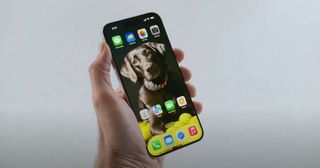
Keen for a Home Screen refresh? In iOS 18, you’ll be able to reposition apps at the bottom or side of the screen for the first time ever, freeing up precious real estate for your all-important wallpaper. You’ll also be able to trigger a new dark mode for app icons, add color tints and even hide app names for a truly minimalist look.
Upgrades to Messages
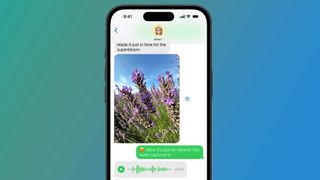
Apple is bringing several key upgrades to the Messages app in iOS 18. You’ll be able to react (or ‘tap-back’) to messages using any emoji, schedule messages to send at a convenient time in the future, and even format text with underlines, strikethroughs and neat new animation effects.
On top of that, the Messages app will support the RCS standard in iOS 18, which should facilitate a richer messaging experience when you’re communicating with someone who doesn’t own an Apple device.
Redesigned Control Center

The Control Center isn’t a glamorous part of your iPhone, but it’s an undeniably important one. In iOS 18, you’ll be able to separate the Control Center into distinct function groups, like Media and Home, as well as resize Control Center widgets. Oh, and you’ll finally be able to edit which Control Center widgets appear on your Lock Screen. Huzzah!
ID-authenticated app locks
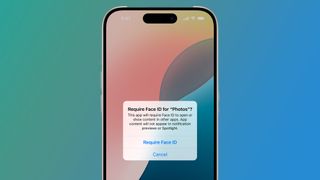
For the suspicious (okay, safety-conscious) iPhone user, iOS 18 will let you add Face ID (or password) authentication to apps you’d rather keep away from prying eyes. You’ll also be able to hide these apps away in a new Hidden Apps folder.
Apple Passwords app
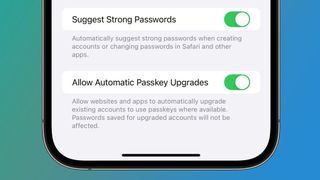
Sticking with the privacy theme, iOS 18 will see Apple introduce its own passwords app, which will make it easier to manage your account passwords, verification codes, passkeys and other important credentials from the convenience of your iPhone.
Restricted iOS 18 features
Messages via Satellite

iOS 18 will expand Apple’s Emergency SOS via Satellite feature by allowing you to text via satellite, too. Alas, like the current version of the service, Messages via Satellite service will be limited to the iPhone 14 series and upwards.
Audio transcription in Notes
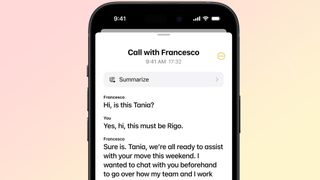
iOS 18 will let you record and transcribe phone calls on any compatible iPhone, as well as start an audio recording directly from the Notes app (rather than via Voice Memos). However, the ability to automatically transcribe those calls and recordings in the Notes app will be reserved for the iPhone 12 and upwards.
Eye tracking
Apple will make iPhones more accessible in iOS 18 through the introduction of eye-tracking. You’ll soon be able to open apps and control certain iOS elements using nothing but your eyes, though you’ll need an iPhone 12 or later for this feature to work.
Music Haptics
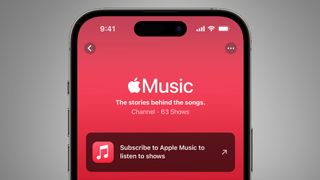
Sticking with the accessibility theme, iOS 18 will introduce a new feature – Music Haptics – that uses your iPhone’s Taptic Engine to pulse in time with the rhythm of a song played through Apple Music. As with many other features on this list, though, you’ll need an iPhone 12 or later to benefit.
Wireless smart lock opening

The Home app is getting an update in iOS 18. Soon, you’ll be able to wirelessly unlock doors equipped with Ultra Wideband (UWB) smart lock. The caveat? You’ll need to own an iPhone with a UWB transmitter, which excludes the iPhone XR, iPhone XS, iPhone XS Max and the original iPhone SE.
You might also like

iOS 18 will become available to download on any iPhone newer than the iPhone XS later this year (likely September), which is great news for anyone who hasn’t yet upgraded to one of the best iPhones. In other words, if you’re still valiantly sporting an iPhone XS, iPhone XR, iPhone…
