The Xbox app on Windows is getting even more handheld-friendly

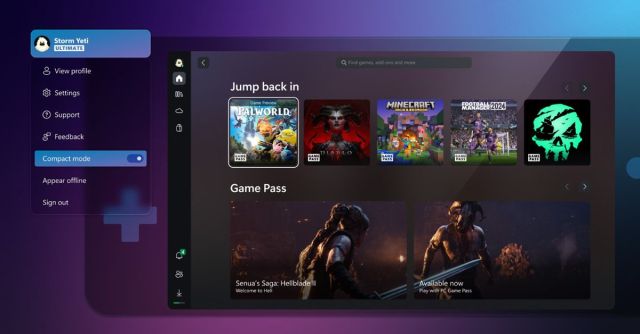
Microsoft introduced a compact mode for its Xbox app on Windows last year, which is designed to improve the handheld experience. While compact mode initially focused on UI improvements for small screens, Microsoft is moving on to tackling some of the challenges of navigating around the Xbox app with a D-pad and sticks.
In a new update for Xbox Insiders today, Microsoft is adding a new “Jump back in” feature that lets you quickly launch games you’ve recently played on a Windows handheld. Jump back in will list up to nine games on the main screen of the Xbox app, and you can press the menu button on a controller to launch the game directly.
It’s intelligent enough to know if you already have a game running, so it’ll simply switch to that instance, and by default, it will navigate to the game hub for a game so you can see which friends are playing, your achievements, and more.
Microsoft is also improving the friends panel to make it easier to access with a handheld or controller. There’s now quick access from the sidebar to a slide-out friends list that has big buttons to tap to join party chats.
While it’s good to see this addition, I still find it difficult to navigate around the Xbox app on a ROG Ally without touching the screen. Accessing the sidebar can often be difficult if you’ve navigated down a page, and the Xbox app seems to get stuck in certain sections and prevent you from accessing the sidebar by navigating left unless you’re at the top of the page or you’ve highlighted a particular element.
Microsoft still has a long way to go to improve the overall handheld experience in Windows, but if you’re a PC Game Pass subscriber who owns a Windows handheld, then you’re getting some early improvements ahead of the Windows team really focusing in on controller navigation throughout the OS.
Microsoft introduced a compact mode for its Xbox app on Windows last year, which is designed to improve the handheld experience. While compact mode initially focused on UI improvements for small screens, Microsoft is moving on to tackling some of the challenges of navigating around the Xbox app with a…
