Google is tweaking Chrome’s search bar to make it easier to navigate the web

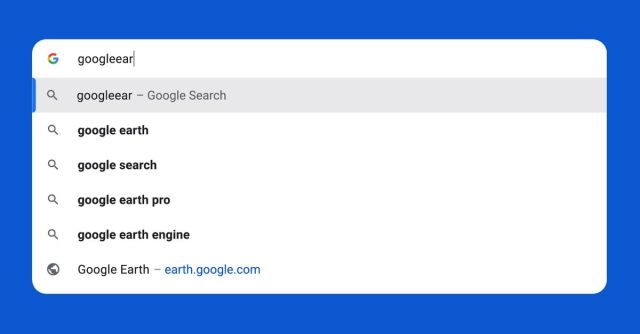
Google is making a few changes to the way its search and address bar — known as the omnibox — works in the Chrome browser. The changes are individually pretty small, but there’s an important and somewhat unexpected trend in them all: Google is making it easier for you to move around the web without having to do so many Google searches.
If you’re in Chrome on desktop or mobile, the browser will now try and correct your URL typos, so when you type thevrege.com or ninteendo.com, you’ll get autocomplete suggestions based on the right site and not whatever is behind those misspelled domains. The omnibox’s autocomplete will now be smarter in general, predicting the site you’re looking for based on keywords rather than just guessing what URL you’re typing. (In Google’s example, you can type “flights,” and Chrome might predict you want to go to Google Flights, whereas before, it would just suggest search queries including the word. It will also work with non-Google sites, though.) Chrome can also now search within your bookmarks for sites and files related to what you’re typing.
All those features are based on your own browsing history and bookmarks, so it’s just Chrome becoming slightly more personalized. But the last change is web-wide and is pretty off-brand for Google: when you start to type in the name of a popular website, the omnibox will show that site’s URL in the list of suggestions, and you can select it to go right to that site. (You might have seen this one already: it’s been rolling out for a couple of weeks and should be live to everyone now.)
These are generally good, helpful web navigation features, but they all mean you’re likely to do fewer Google searches
These are generally good, helpful web navigation features, but they all mean you’re likely to do fewer Google searches. One of the pillars of the search business is what’s known as navigational search: a huge percentage of the internet gets to Facebook, for instance, by Googling the word “Facebook” and clicking the top result. Typos, too, account for more search queries than you’d think. In the past, the Chrome team has been steered away from features like these precisely because they might drive down the number of Google searches people do every day.
But now, a few things have changed that might make Google more amenable to this kind of feature. First, it’s embroiled in a landmark antitrust lawsuit that alleges Google is a search monopoly and abuses its power at consumers’ expense. Second, as Google embraces AI through the Search Generative Experience — which CEO Sundar Pichai has said in no uncertain terms is the future of search — every query has become literally more expensive for Google since it has to query its large language models to get answers. Many of these navigational searches don’t have ads anyway, so Google might actually be happy to get people off its search results page for a change. Ultimately, maintaining Chrome’s dominance — which keeps Google as most people’s main search engine — is probably worth a few small feature tradeoffs.
Along with all these changes, Google says it’s tweaking the visual layout of the omnibox to make it easier to read and faster to load. It seems as if, at least in Chrome, Google is ever so slightly de-emphasizing the importance of the search results page and elevating the address bar and the suggestions dropdown to make it faster to move around the web. (One possible outcome of this is that we get sponsored autocompletes, but that’s a thing we’ll worry about another day.) In so many ways, what it means to search the internet is changing. Even Google is having to move fast to keep up.
Google is making a few changes to the way its search and address bar — known as the omnibox — works in the Chrome browser. The changes are individually pretty small, but there’s an important and somewhat unexpected trend in them all: Google is making it easier for you to move around…
